Discover If Your Apple Watch Can Finally Catch Your Snoring
How to Help Your Apple Watch Track Snoring Accurately
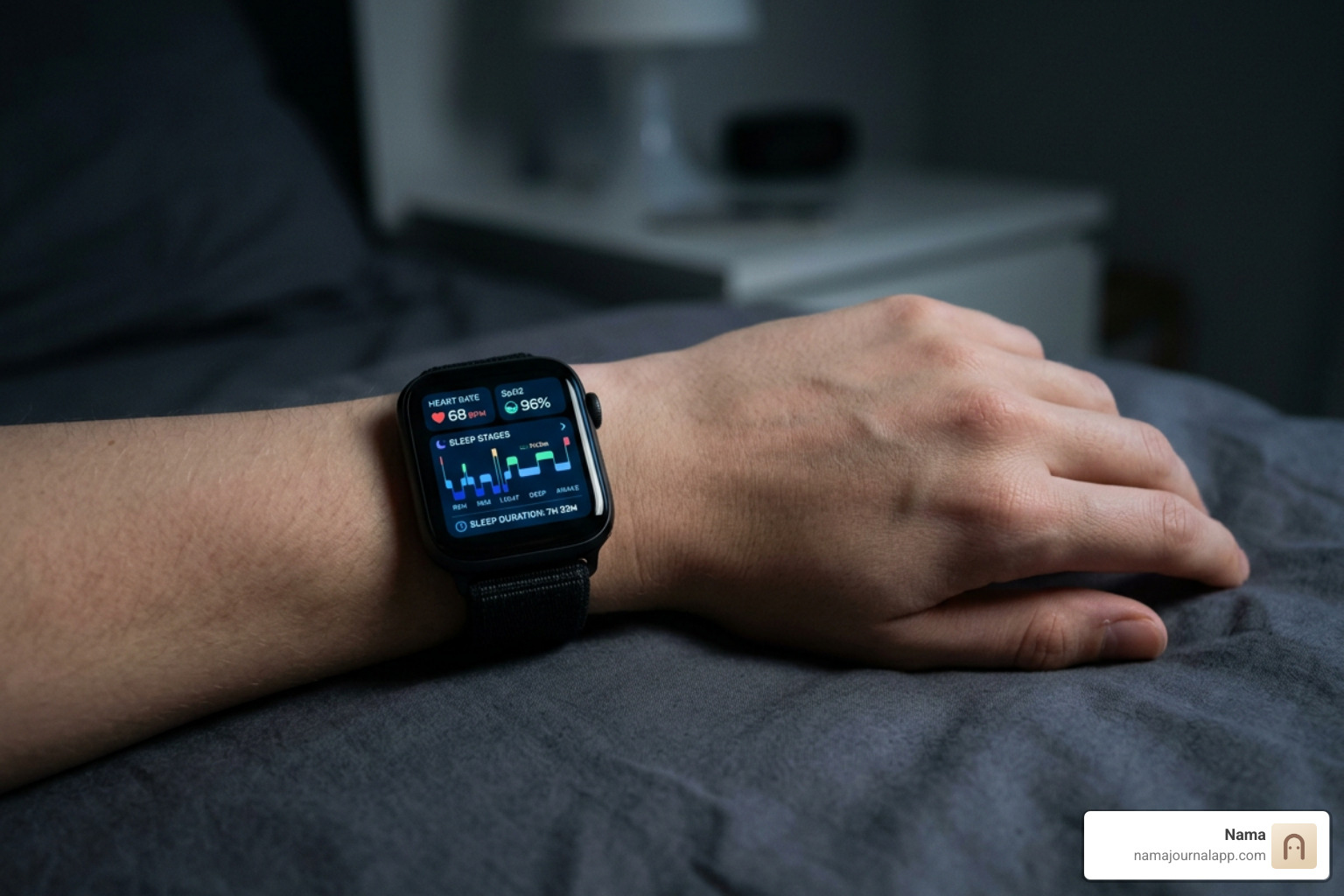
While the native watchOS experience does not feature a dedicated microphone switch to capture sound bites of your snoring, the hardware on your wrist remains an exceptional sleep lab companion. To get the most accurate picture of your nocturnal rest, you need to understand how the physical sensors operate in tandem.
Your Apple Watch relies on a sophisticated cluster of hardware:
- High-Precision Accelerometer: Tracks microscopic wrist twitches, arm shifts, and full-body posture changes throughout the night.
- Photoplethysmography (PPG) Optical Heart Sensor: Uses green and infrared light arrays to measure continuous pulse rate, resting heart rate, and Heart Rate Variability (HRV).
- Blood Oxygen Sensor (SpO2): Available on Series 6 and newer models (hardware/region dependent), measuring peripheral oxygen saturation during deeper rest cycles.
- Wrist Temperature Sensor: Introduced on Series 8 and Ultra models, sampling skin baseline temperature every five seconds to capture circadian and physiological shifts.
When you slip into bed, these sensors track your autonomic nervous system's response to rest. Snoring often triggers micro-arousals—brief spikes in sympathetic tone where your heart rate jumps slightly, your HRV drops, and your wrist shifts as your body fights for an open airway. By pairing native health metrics with bedside acoustic apps, you can cross-reference your audible rumbles against sudden spikes in physical restlessness.
Why Doesn't Apple Watch Track Snoring via Built-In Audio?
Many users wonder why a device equipped with high-end microphones cannot simply record nighttime audio. The answer comes down to two major design choices: battery preservation and strict privacy architecture.
Continuous audio recording and real-time acoustic analysis require significant processing overhead. Running an active microphone buffer throughout an eight-hour sleep session would drain the watch's battery, leaving you with a dead device by morning.
Furthermore, Apple enforces strict sandbox limitations on background microphone usage within watchOS. Because an Apple Watch travels with you everywhere, keeping an open microphone running all night presents serious privacy risks. Rather than turning the wearable into a constant listening bug, watchOS focuses strictly on kinematic and optical data, delegating intensive audio analysis to external, dedicated applications where permissions can be clearly audited.
Apple Watch Sleep Stage Accuracy and Metric Reliability
To understand what happens when you snore, you need accurate sleep architecture tracking. If your snoring peaks during light sleep versus rapid eye movement (REM) sleep, it can point to different physical triggers such as muscle tone relaxation or sleep positioning.
Clinical validation studies comparing the Apple Watch against polysomnography (PSG)—the gold standard multi-channel clinical sleep study—show that the watch performs admirably against consumer benchmarks, though with clear strengths and weaknesses:
- Light Sleep Sensitivity: Reaches approximately 86%, reliably detecting entry-level non-REM rest.
- REM Sleep Detection: Shows roughly 82% to 83% sensitivity in multi-night validation cohorts.
- Deep Sleep (Slow-Wave Sleep) Accuracy: Drops to around 51% sensitivity. Group-level evaluations reveal that the watch tends to underestimate slow-wave sleep duration by approximately 43 minutes while overestimating light sleep by roughly 45 minutes.
- Overall Statistical Agreement: Validation studies document a Cohen’s kappa between 0.53 and 0.60, representing moderate to substantial agreement with clinical PSG setups—ranking it among the highest-performing consumer wrist wearables on the market.
These metrics mean that while your watch might slightly miss the exact transition into deep restorative sleep, its broader map of your sleep architecture provides a dependable baseline to evaluate nocturnal disturbances.
Understanding Breathing Disturbances and Sleep Apnea Alerts
Sleep apnea is estimated to affect more than 1 billion people worldwide, and the vast majority of cases remain entirely undiagnosed. While routine snoring is caused by turbulent airflow vibrating soft tissues in the upper airway, obstructive sleep apnea (OSA) involves complete or partial collapse of the airway, choking off oxygen delivery to the lungs.
To address this global health challenge, Apple introduced groundbreaking health features that brought an FDA-cleared Sleep Apnea Notification algorithm to the wrist.
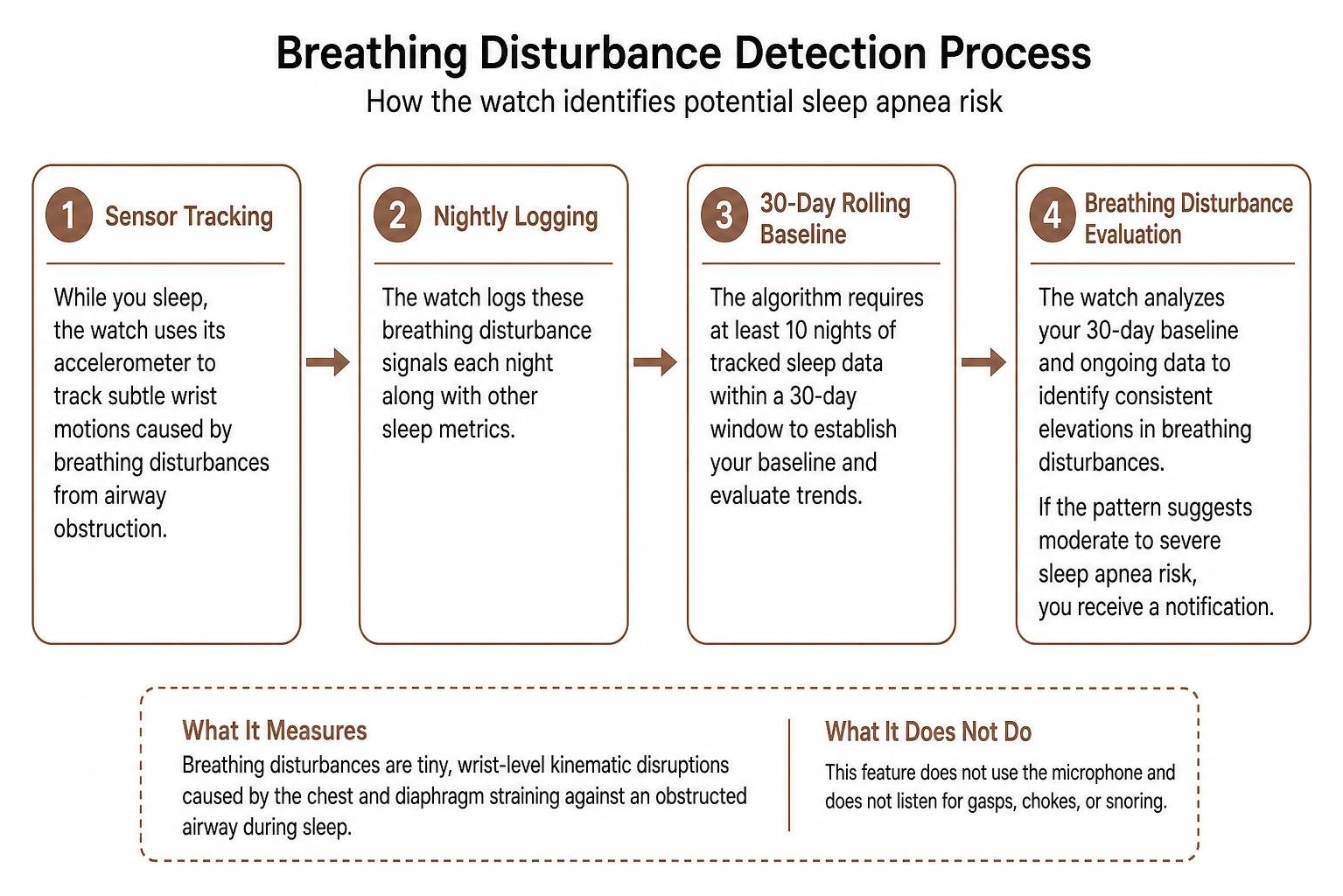
This feature does not listen for gasps or chokes. Instead, it uses the wrist accelerometer to measure Breathing Disturbances—tiny, wrist-level kinematic disruptions caused by the chest and diaphragm straining against an obstructed airway during sleep.
The evaluation process operates on a strict framework:
- Sensor Tracking: The watch logs subtle physical motions linked to irregular breathing pauses every night.
- 30-Day Rolling Baseline: The algorithm requires at least 10 nights of tracked sleep data within a 30-day window to evaluate trends without triggering false alarms from a single night of nasal congestion.
- Clinical Thresholds: If the data shows persistent, recurring "Elevated" breathing disturbances across the evaluation period, the user receives an alert warning of potential moderate to severe sleep apnea.
- Clinical PDF Export: Users can export a three-month breathing disturbance report directly from the Health app to bring to a medical consultation.
In clinical trials submitted for regulatory clearance, every single participant flagged by the algorithm was confirmed to have at least mild sleep apnea upon clinical examination.
Snoring vs. Sleep Apnea: Key Differences to Know
It is vital to distinguish between benign primary snoring and clinical obstructive sleep apnea. While both stem from airway resistance, their physiological consequences diverge dramatically:
- Primary Snoring: Turbulent airflow vibrates the uvula, soft palate, or pharyngeal walls. Breathing remains rhythmic, blood oxygen levels remain stable, and sleep architecture suffers minimal fragmentation.
- Obstructive Sleep Apnea (OSA): Physical blockage causes partial hypopneas or full apneas. Airflow drops, the Apnea-Hypopnea Index (AHI) climbs, arterial blood oxygen desaturates, and the brain is forced into emergency micro-awakenings to reopen the throat.
If your snoring is accompanied by morning dry mouth, daytime brain fog, waking up gasping for air, or high blood pressure, you should treat it as a potential medical issue rather than simple nighttime noise.
How to Bridge the Gap: Adding Snore Audio Tracking Safely
Because watchOS handles the kinematics while leaving the acoustic layer untouched, you can bridge the gap by combining your watch's biometric streams with bedside audio capture. Privacy-conscious third-party tools use the iPhone’s advanced microphone and digital signal processing (DSP) to isolate snore frequencies from ambient bedroom noises like fans, passing traffic, or a restless partner.
| Feature / Metric | Native Apple Watch (watchOS) | Bedside Acoustic Audio Tools |
|---|---|---|
| Acoustic Snore Detection | No (microphone inactive during sleep) | Yes (local digital signal processing) |
| Snore Decibel & Frequency Tracking | No | Yes (measures volume and duration) |
| Breathing Disturbance Detection | Yes (wrist accelerometer micro-motion) | No (cannot measure physical kinematics) |
| Sleep Stage Classification | Yes (PPG optical sensor + motion) | Indirect (estimated only via sound/movement) |
| Real-Time Haptic Nudges | Supported via third-party companion apps | Phone-based speaker chimes or watch triggers |
| Battery Impact | Low to moderate overnight drain | iPhone runs on nightstand charger |
| Clinical Clearance | FDA-cleared sleep apnea screening | General wellness and logging tool |
By pairing these two data streams, you can look at your morning dashboard and see whether a spike in acoustic snoring at 3:15 AM coincided with an elevated breathing disturbance on your wrist and a drop in HRV.
Step-by-Step Setup: Helping Apple Watch Track Snoring Privately
To set up a reliable, private system that lets your Apple Watch track snoring alongside your phone, follow this step-by-step workflow:
- Enable Native Sleep Tracking: Open the Watch app on your iPhone, navigate to Sleep, and toggle on Track Sleep with Apple Watch. Ensure Sleep Schedule or Sleep Focus is active so the watch automatically enters low-power display mode and activates biometric sensors.
- Activate Health Metrics: In the Health app, verify that Breathing Disturbances, Heart Rate, and Wrist Temperature permissions are enabled under your Health Profile.
- Calibrate Bedside Audio App: Select a snore detection application that utilizes on-device machine learning models (trained on acoustic datasets to prevent false positives from ambient room noise).
- Optimize Hardware Placement: Fasten your Apple Watch snugly—one finger's width above your wrist bone—so optical sensors maintain continuous skin contact. Place your iPhone on your nightstand at head level, unobstructed by heavy pillows or blankets, and plug it into its charger.
- Enable Silent Wrist Nudges (Optional): If your companion snore tool supports watchOS haptics, enable tactile alerts. When the iPhone microphone detects continuous snoring, it sends a silent tap to your wrist, prompting you to roll onto your side without waking you up completely.
- Morning Correlation: When you wake, review the logged audio timestamps against your Apple Health sleep stages to pinpoint your personal snoring triggers.
Privacy Considerations: Keeping Bedroom Audio Strictly Offline
Recording sound inside your bedroom introduces obvious privacy considerations. Your sleeping environment is deeply personal; raw audio files can easily pick up private conversations, ambient family noise, or sensitive domestic sounds.
Many legacy sleep apps stream raw audio to third-party cloud servers for machine learning analysis. This creates unnecessary data privacy risks, as your private home recordings are transmitted across networks and stored in remote databases.
When choosing software to capture nighttime audio, insist on on-device processing:
- Local Digital Signal Processing (DSP): Sound waves are analyzed in real-time within the phone's volatile memory and immediately discarded.
- Encrypted Metadata Only: The app should store only timestamps, decibel levels, and snore frequency numbers—never raw voice recordings.
- Zero Cloud Ingestion: Verify that the software operates without mandatory cloud account creation or external server syncing.
Keeping your health and sound telemetry completely offline ensures that your personal sleep patterns remain yours alone.
Actionable Steps When Breathing Disturbances or Snoring Spike
If your nightly logs reveal a sudden spike in snoring duration or your Apple Watch flags consistent elevated breathing disturbances, take immediate, structured steps to identify the root cause:
- Audit Common Lifestyle Triggers:
- Alcohol Consumption: Drinking alcohol within three to four hours of bedtime acts as a central nervous system depressant, relaxing the upper airway muscles and causing severe soft tissue collapse.
- Sleeping Position: Supine sleep (lying flat on your back) allows gravity to pull the base of the tongue backward into the airway. Experiment with side-sleeping pillows or elevation wedges.
- Nasal Congestion & Allergies: Swollen nasal passages force chronic mouth breathing, which destabilizes the lower pharynx and amplifies snoring vibrations.
- Complete a Validated Screening Questionnaire:
- Use the clinical STOP-BANG assessment (evaluating Snoring, Tiredness, Observed apneas, high blood Pressure, Body mass index, Age, Neck circumference, and Gender) to calculate your clinical risk profile in under two minutes.
- Prepare a Clinical Dossier:
- Open the Apple Health app, navigate to Respiratory > Sleep Apnea Notifications, and generate a 30-day or 90-day PDF export. Combine this with your logged snore timestamps and lifestyle notes.
- Consult a Medical Professional:
- Present your gathered data to your primary care physician or a board-certified sleep specialist. They can schedule a comprehensive Home Sleep Apnea Test (HSAT) or an in-lab polysomnography to determine if medical intervention—such as continuous positive airway pressure (CPAP), custom mandibular advancement devices, or targeted positional therapy—is required.
Frequently Asked Questions About Snore Tracking on watchOS
Which smartwatch models support breathing disturbance notifications?
The native Breathing Disturbances metric and FDA-cleared Sleep Apnea Notification algorithm are supported on Apple Watch Series 9, Apple Watch Series 10, and Apple Watch Ultra 2 (as well as subsequent hardware running modern watchOS versions). Older models lack the specific accelerometer sampling resolution and processing architecture required to isolate respiratory micro-motion from regular sleep movements.
Can silent haptic feedback stop active snoring without waking you?
Yes. Gentle, progressive haptic pulses delivered to your wrist act as a tactile cue. In many individuals, this subtle vibration creates a "micro-arousal"—a tiny shift in neurological state that restores upper airway muscle tone and encourages you to shift sleep positions without pulling you out of your natural sleep architecture.
Is consumer wearable sleep data accurate enough for a medical diagnosis?
No. While consumer wearables provide excellent longitudinal screening trends, they cannot measure brainwave activity (electroencephalogram), eye movements (electrooculogram), submental muscle tone (electromyogram), or direct nasal airflow. Only a formal diagnostic test scored by a qualified clinician can diagnose sleep disorders like obstructive sleep apnea.
Conclusion
Your Apple Watch is a powerful window into your overnight physiology. While it doesn't listen to your bedroom sounds, its ability to track sleep stages, heart metrics, and motion-based breathing disturbances makes it an indispensable tool for understanding your health. By safely combining native wrist tracking with local, private bedside sound analysis, you can get a complete, multi-layered view of your nocturnal rest.
True wellness, however, happens when you connect what occurs during the night with what you do during the day. Tracking whether late-night snacks, evening workouts, stress spikes, or seasonal allergies trigger your snoring requires a unified approach. For users looking for the best health tracker app style of intentional, dedicated journaling on iOS, Nama offers a completely offline, zero-account wellness companion. By logging your daily meals, routines, exercise, and subjective energy levels locally on your iPhone, you can correlate your daytime choices with your nighttime data—giving you complete ownership over your health journey, with total privacy.