A Practical Guide to Finding the Best Habit Tracker App
Find the Right Habit Tracker App for Your Routine
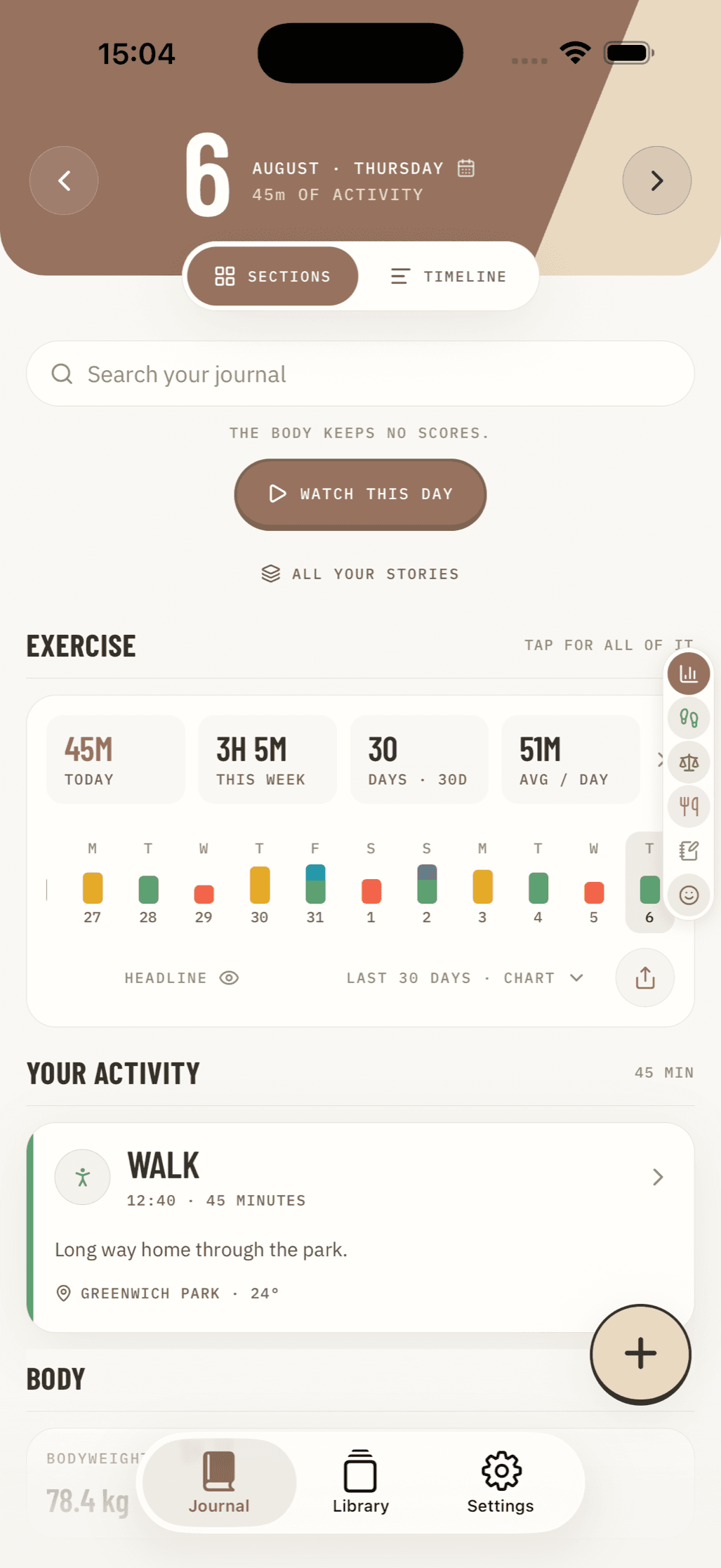
The best habit tracker app is the one you will open every day: it should make check-ins quick, support the schedule you actually follow, and keep your personal data where you are comfortable storing it.
For a fast answer, choose based on your priority:
| If you need... | Look for... |
|---|---|
| A private, offline journal | Local storage, no required account, exports, and no ads |
| Flexible exercise or wellness goals | Weekly targets, custom quantities, and forgiving progress scores |
| A simple daily routine | One-tap check-offs, reminders, and a home-screen widget |
| Motivation through play | Points, rewards, characters, or RPG-style challenges |
| Use across devices | Reliable iOS and Android sync, plus clear privacy controls |
A tracker is not a shortcut to change. A widely cited University College London study found that habits took about 66 days on average to become automatic, not 21. The right app can still reduce friction: record a walk, meal, mood, or bedtime when it happens, then review patterns without turning your wellbeing into a public feed or a pile of notifications.
This guide compares the leading options for iPhone, Android, free use, gamification, cross-platform access, and privacy-first tracking. It also explains what matters beyond a streak - especially flexible schedules, offline storage, and data you can export.
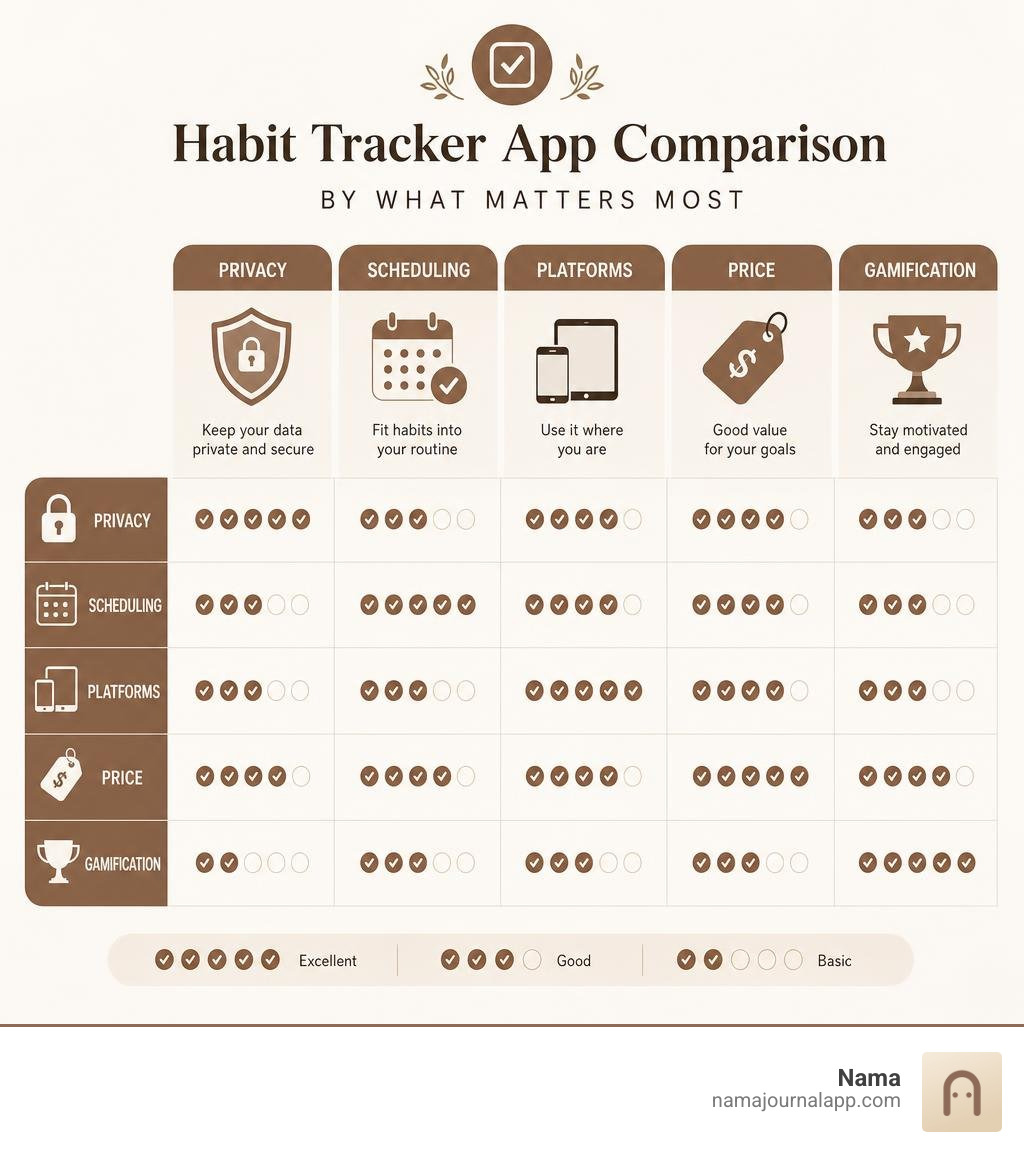
Key Features to Consider in a Habit Tracker App
When we search for a habit tracker app, it is easy to get distracted by sleek visual animations, fancy AI assistants, or complex points systems. However, through our extensive evaluation of dozens of productivity tools, we have found that long-term success comes down to software health, usability, and low-friction design. A great daily tracker should never feel like a second job.
If an application requires five menu taps just to record that you drank a glass of water or flossed your teeth, friction wins and consistency vanishes. The ideal tool should allow you to complete an entry in one or two quick taps right from your home screen or lock screen. Beyond speed, key core Features to evaluate include:
- Tracking Flexibility: The ability to move beyond rigid daily binary checkboxes (Yes/No) to track numerical targets, flexible weekly frequencies, and multi-day routines.
- Smart Location and Time Reminders: Contextual nudges that prompt you at the exact moment and place where a habit occurs, such as arriving at the gym or waking up in the morning.
- Home Screen Widgets: Interactive quick-access tools that let you log routine items without needing to open the main app interface.
- Intuitive Speed and Ease of Use: Minimalist navigation that loads instantly, letting you mark off daily gestures in seconds.
- Instant Visual Statistics: Clear graphs, habit strength scores, and trendlines that show long-term momentum without confusing data overload.
Flexible Scheduling and Forgiving Streak Rules
One of the main reasons people abandon habit tracking is the psychological penalty of breaking a strict daily chain. Traditional streak counters operate on a fragile premise: miss a single Tuesday because of an unexpected work deadline or illness, and your counter resets to zero. This "all-or-nothing" design creates burnout and discouragement.
Modern behavioral science favors flexible scheduling and forgiving streak mechanics. Instead of enforcing an unbroken chain of consecutive calendar days, robust tools calculate long-term habit strength.
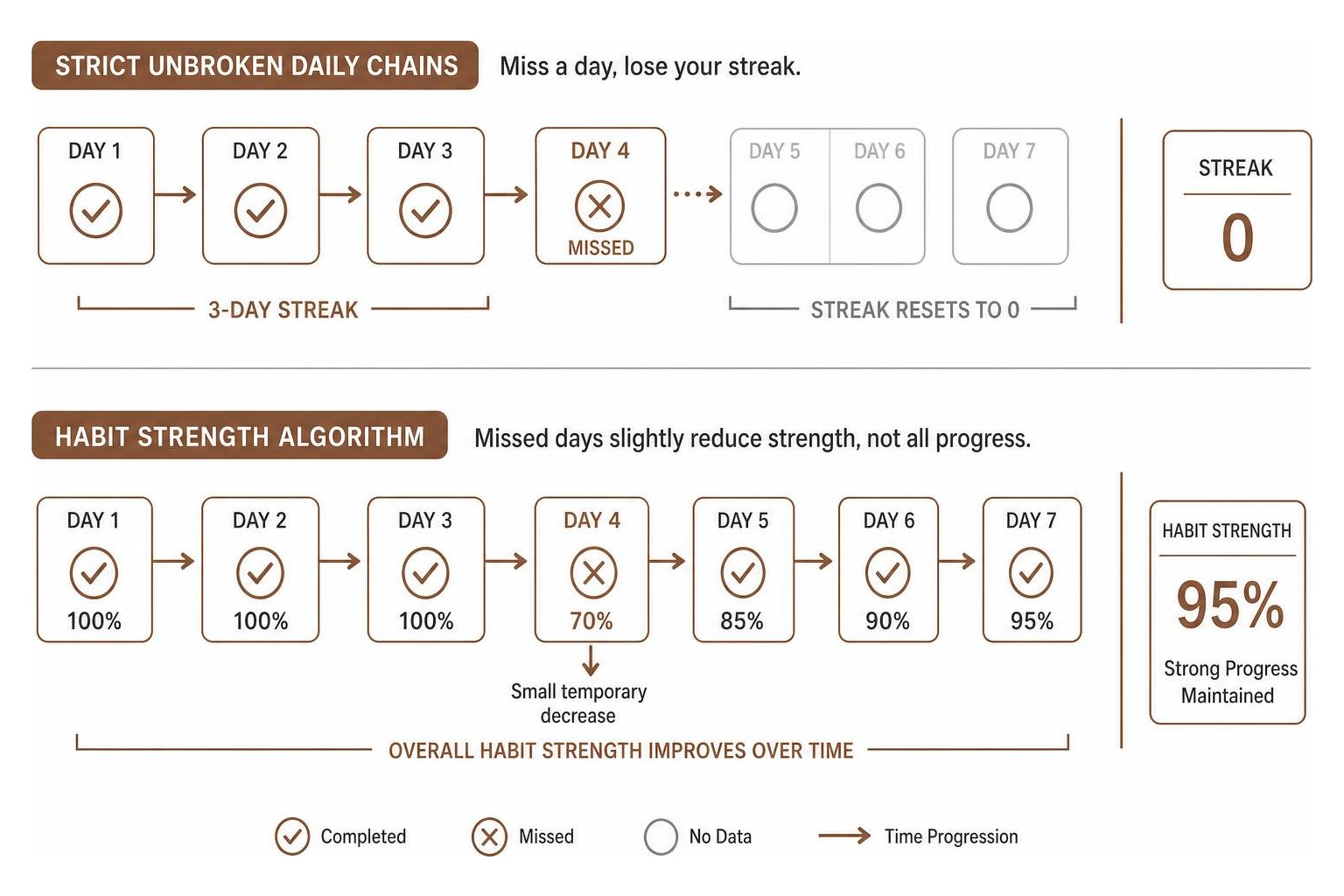
Under a habit strength scoring model, missing a day after three weeks of steady consistency only causes a slight dip in your overall percentage score rather than wiping out all your hard-earned progress. Furthermore, routines rarely fit a strict seven-day daily cadence. Recommended physical health benchmarks often call for specific weekly targets, such as completing 150 minutes of moderate cardio and two strength training sessions per week. A practical software tool allows you to configure goals like "3 times per week" or "every 2 days" rather than demanding daily check-ins.
Flexible tools also support habit stacking—the behavioral practice of linking a new desired action directly to an established daily routine (such as taking vitamins immediately after your morning coffee). By setting up sequential check-ins and contextual triggers, your software helps reinforce natural behavioral loops.
HealthKit and Cross-Platform Integration Options
For users who want to minimize manual data entry, automated platform integration is invaluable. On iOS, deep integration with Apple HealthKit enables your application to passively capture quantitative health parameters such as daily steps, active workout calories, sleep duration, and mindfulness minutes. Instead of manually recording that you slept 7.5 hours, background syncing logs the data automatically so you can focus on building qualitative behavioral routines.
If you operate across multiple operating systems—such as carrying an iPhone for personal use while working on a Windows laptop or Android tablet—cross-platform availability becomes essential. Broad multi-device synchronization ensures your schedule and logs stay up to date regardless of which screen is in front of you.
For users who want to combine daily habit maintenance with broader task management, project planning, and calendar schedules, utilizing established task ecosystems provides an effective central hub to maintain daily schedules and long-term task lists in one unified workflow.
Evaluating Privacy and Data Storage Capabilities
While convenience is vital, data privacy is one of the most overlooked aspects when choosing software to log personal daily behaviors. Your daily logs paint a detailed, intimate portrait of your personal life: when you wake up, your mental health patterns, dietary logs, exercise frequency, medications, and evening routines.
Many modern productivity services store your personal records on remote cloud servers, requiring account registration, continuous background internet connections, and email addresses. Cloud-first setups present potential privacy trade-offs: data breaches, server downtime, third-party data tracking, or sudden service shutdowns if a developer decides to stop maintaining the platform.
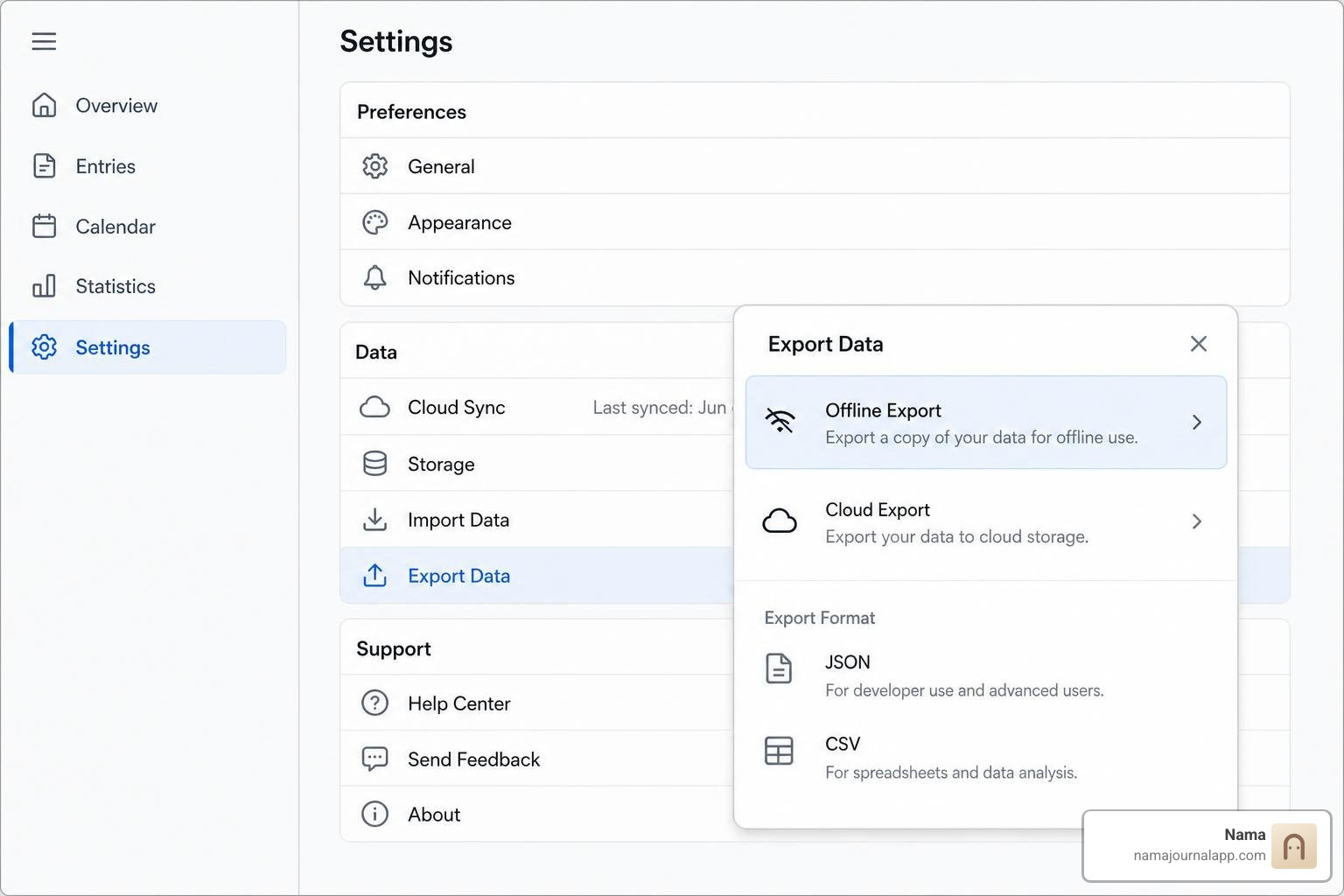
By contrast, zero-trust and local-first software models store all records directly on your device's internal memory. This private approach offers several distinct advantages:
- Complete Offline Functionality: You can record notes, meal logs, and exercise routines deep in the wilderness, on an airplane, or during network outages without losing access.
- Absolute Privacy: No personal health data, daily routines, or personal notes leave your physical device, eliminating risk from server-side security leaks.
- Complete Data Ownership: You are not locked into a proprietary cloud server. You can back up and export your entries whenever you choose.
When choosing a long-term journal and tracker, look for tools that give you full ownership of your records through flexible export formats like CSV (spreadsheet files) or SQLite database files. CSV exports allow you to open your entire entry history in tools like Excel or Google Sheets, analyze your own trends, or archive your records safely on your own personal hard drive. With options to Track Anything offline, you maintain total control over your personal metrics.
Free vs. Paid Features in Every Habit Tracker App
The business models powering productivity tools vary widely across app stores. Understanding these pricing structures helps you avoid unexpected feature paywalls down the road.
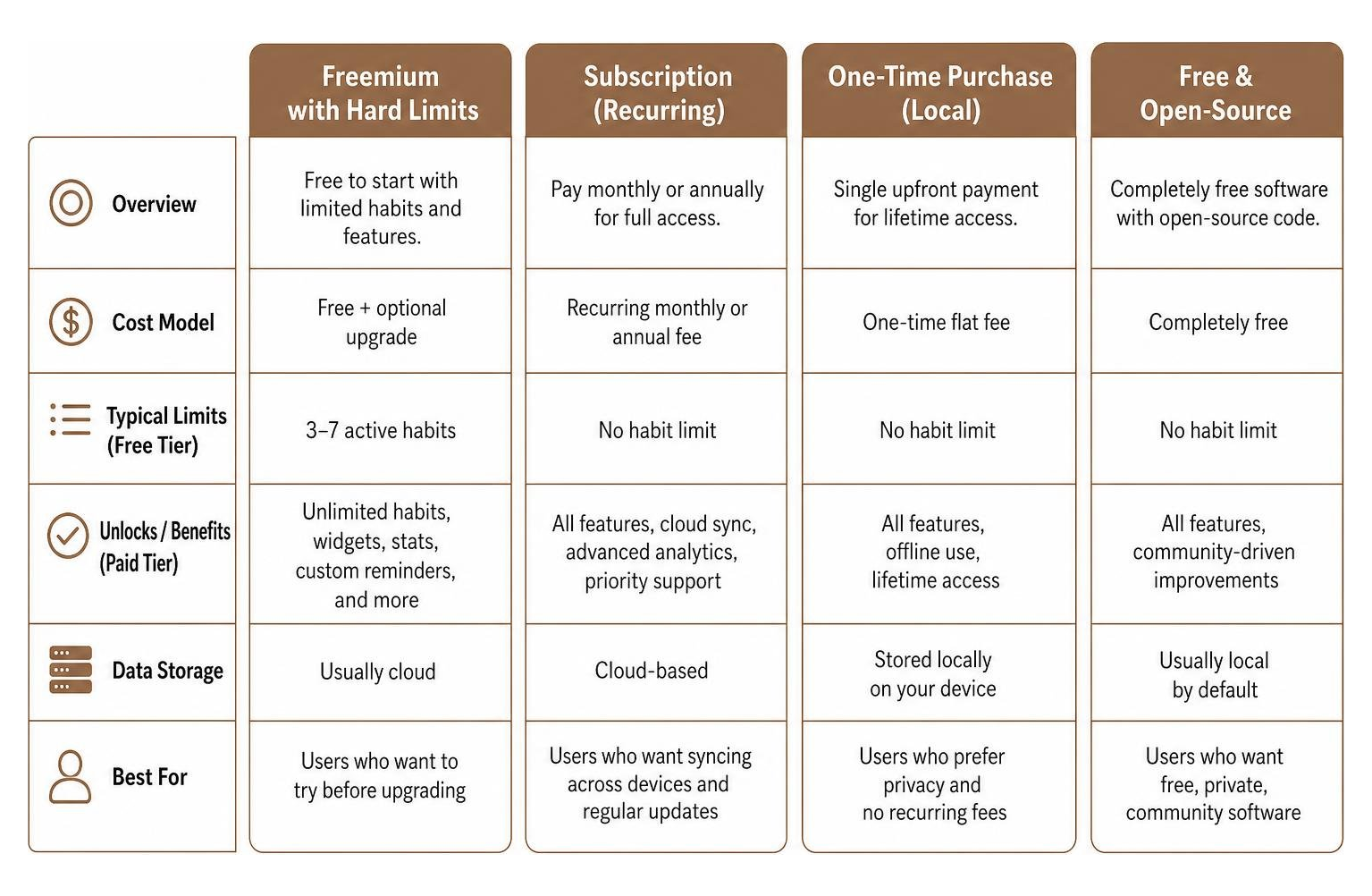
- Freemium with Hard Limits: Many popular applications offer a free tier that caps tracking at 3 to 7 active habits. To unlock unlimited routine tracking, home screen widgets, detailed long-term statistics, or custom reminders, users are required to subscribe to a monthly or annual recurring payment.
- Subscription Pricing: Subscriptions typically range from $4.17/month (billed annually) up to $6.99/month for premium tiers. Subscriptions often fund ongoing cloud server hosting, multi-device syncing, and continuous app development.
- One-Time Upfront Purchase: Some utilities—especially iOS-native or privacy-focused offline apps—charge a single flat fee (such as $5.99 one-time). This grants lifetime access to all features without ongoing monthly fees.
- Free and Open-Source: Fully free, open-source software built by independent developer communities offers zero paywalls, zero ads, and complete privacy. However, these tools may lack polished UI designs or direct customer support channels.
When evaluating free versions, test whether essential features—such as custom reminder schedules, widget support, and data export capability—are accessible without a subscription.
Gamification vs. Minimalist Approaches for Different Users
Habit software generally falls into two distinct design philosophies: gamified RPG mechanics and minimalist tracking interfaces. Choosing between them depends on your personal personality, goals, and attention style.
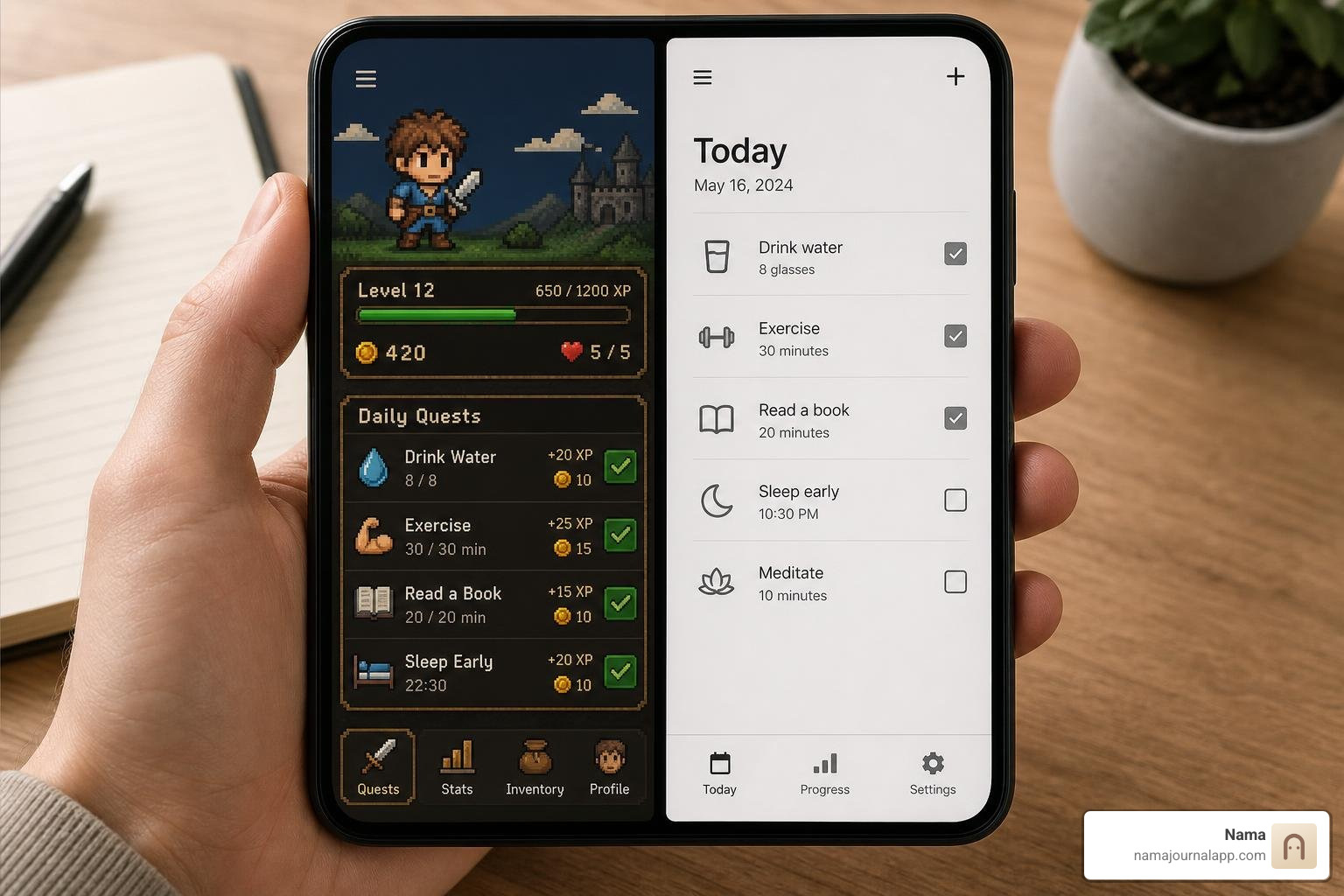
Gamified Approaches transform routine maintenance into a role-playing game (RPG). Completing your real-world daily tasks—such as drinking water, studying, or exercising—earns your virtual avatar experience points, gold coins, armor, and pets. Missing a task might inflict damage on your avatar or even affect your friends in cooperative party quests.
- Best for: Gamers, students, adults with ADHD, or anyone who struggles with internal motivation and needs immediate extrinsic rewards to kickstart routine building.
- Potential downsides: Over time, managing game avatars, inventory, and party quests can introduce visual clutter and operational friction, making checking off simple real-world tasks feel overwhelming.
Minimalist Approaches prioritize clean design, quiet functionality, and speed. These applications remove character avatars, virtual currencies, and complex reward systems in favor of sleek typography, quick-tap checklists, and simple progress rings.
- Best for: Busy professionals, power users, and practitioners of identity-based habit systems who prefer a clean space to record routines without extra gamified distractions.
- Potential downsides: Requires strong intrinsic motivation, as the application will not award virtual gold or push external RPG incentives when you finish a workout.
Gamification helps jumpstart momentum when building new routines, whereas minimalist approaches excel at sustainable, low-friction tracking over years.
Choosing a Habit Tracker App Based on Experience Level
Your ideal tool will likely change as you move from building your first routine to managing complex personal schedules.
For Beginners: If you are new to tracking, start with a tool that provides structured routine templates, clean interfaces, and strict limiters (tracking just 1 to 3 core habits at first). Trying to track 15 new habits simultaneously on day one almost always leads to overwhelm. Focus on simple identity-based habits—such as writing a single sentence daily or doing five push-ups—to build momentum before adding advanced features. Pairing your progress with an integrated tool for Journal and Notes helps reflect on your daily wins.
For Power Users: Experienced users often require advanced data logging capabilities. Power users benefit from applications that allow custom numerical tracking (e.g., tracking exact grams of protein, sleep hours, or workout weights), conditional reminder rules, tag filtering, and detailed graphical data analysis to audit long-term behavioral trends.
Troubleshooting Common Issues and Sync Errors
Even the most reliable software occasionally encounters technical issues. Understanding how to troubleshoot common system errors ensures your routines stay uninterrupted.
Here are the most common operational issues users encounter with mobile tracking software, along with practical steps to resolve them:
- Delayed or Missing Reminders: Modern mobile operating systems (both iOS and Android) employ aggressive background battery optimization features. If your application's notifications fail to trigger at the scheduled time, navigate to your device's battery settings and set the app's battery usage to "Unrestricted." Additionally, verify that scheduled summary settings on iOS are not batching your daily habit alerts into a delayed time block.
- Home Screen Widget Refresh Failures: If a home screen widget displays outdated progress or fails to register a check-off tap, it is usually due to memory limits imposed by the operating system. Removing the widget from your home screen and re-adding it immediately refreshes the background widget cache.
- Background Sync Conflicts: When using multi-device cloud synchronization, checking off a habit on your phone while your laptop is offline can cause sync conflicts. To prevent duplicate entries or overwritten streaks, always allow your application a few seconds to perform a cloud sync upon opening before marking off tasks.
- Wearable and Health Kit Disconnects: If automated step or workout data stops populating, navigate to your phone's central Privacy and Health settings. Revoke the app's read permissions, restart your device, and re-grant permissions to restore automated data pipelines.
Frequently Asked Questions About Habit Tracking Software
How long does it actually take to form a new daily habit?
A widespread myth claims that it takes exactly 21 days to form a new habit. However, empirical behavioral science research tells a different story. A benchmark 2014 study conducted by researchers at University College London found that it takes an average of 66 days for a new behavior to become truly automatic.
Depending on the complexity of the task and individual psychological variations, the actual range observed in the study spanned anywhere from 18 to 254 days. Simple daily gestures like drinking a glass of water after waking up achieve automaticity much faster than complex routines like 45 minutes of morning cardio. Real habit formation requires patience, consistent repetition, and long-term tracking rather than expecting magic results in three short weeks.
Why do flexible streak algorithms work better than strict daily chains?
Strict daily chains rely on an unforgiving metric: complete the habit every single day, or your streak counter drops to zero. While this can provide strong short-term motivation, it creates fragile psychological conditions. When life inevitably interferes—due to travel, illness, or emergency—missing a single check-in wipes out months of visible progress. This often triggers the "what-the-hell effect," where users abandon the behavior entirely after a broken streak.
Flexible streak algorithms use mathematical habit strength formulas instead. Missing a single day causes a minor temporary decline in your overall percentage score rather than a complete reset. Forgiving models preserve your hard-earned psychological momentum, reward long-term consistency over perfection, and encourage you to get right back on track the following day.
Is local data storage safer than cloud-based habit tracking?
Yes, local data storage provides significantly higher privacy and security protection for sensitive personal logs. Cloud-based applications transmit your personal habit records, health data, and daily logs over the internet to centralized remote servers. This introduces potential risks from server-side database breaches, cloud outages, unauthorized data mining, or account hijacking.
Local-first applications store all your entries encrypted directly on your smartphone's physical hardware. No account creation is required, no personal data leaves your device, and external internet connectivity is completely unnecessary. As long as you maintain regular personal backups (via local CSV or database exports), local storage ensures your personal health logs remain entirely private, secure, and under your personal control.
Conclusion
Choosing the right habit tracker app comes down to understanding your personal style, privacy values, and routine goals. Whether you thrive on gamified RPG quests, need flexible weekly schedules for exercise, or prefer a quiet offline space to log health metrics, selecting a tool with low friction and strong software maintenance ensures you stay consistent for the long haul.
Software is simply a supporting framework—the real progress comes from the small daily actions you take. By focusing on flexible goal-setting, tracking identity-based behaviors, and protecting your personal data privacy, you set yourself up for sustainable, long-term personal growth.
For readers seeking a completely private, offline-first experience on iOS, Nama offers a zero-trust wellness journal that lets you log custom health metrics, daily exercises, meals, and visual notes locally on your iPhone—with no account required and full data export capabilities. Discover more guide articles and behavioral insights on our Blog, or explore how our local-first tool can support your personal journey by visiting Nama.