Track Your Vitals Accurately Using Top Android BP Monitors
How to Choose the Best Mobile App to Monitor Blood Pressure

Selecting the right tool to record your vitals comes down to reliability, usability, and data ownership. When evaluating an android app to monitor blood pressure, consider these primary criteria:
- Hardware Compatibility: Does the tool pair smoothly with your existing home hardware via Bluetooth, or does it provide a clean, fast manual interface?
- Trend Visualisation: Clear visual charts help you spot whether your numbers are creeping upward over time or responding well to lifestyle adjustments.
- Custom Tagging: Blood pressure fluctuates continuously. Being able to record context—such as "post-workout," "poor sleep," "missed morning meds," or "high-sodium dinner"—turns raw numbers into actionable clinical insights.
- Guideline Support: Look for tools that allow you to categorize readings according to established clinical benchmarks, such as the 2025 AHA/ACC or ESC/ESH hypertension standards.
Core Features in a Mobile App to Monitor Blood Pressure Logically
A well-designed logging tool should simplify your daily routine rather than add friction. When we examine comprehensive mobile features for tracking everyday wellness, several functional elements stand out:
- Automated and Manual Capture: Seamless synchronization with Bluetooth monitors saves time, but an intuitive keypad for manual logging ensures you never skip an entry when using standard medical hardware.
- Centralized Health Ecosystem Sync: Support for modern data bridges like Health Connect allows your vitals to communicate with other wellness metrics without creating isolated data silos.
- Structured PDF and CSV Reporting: Your physician does not have time to scroll through an app interface during a 15-minute consultation. One-click report generation with calculated averages (such as 7-day morning and evening means) is essential.
- Smart Reminders: Consistent timing is critical for accurate trend analysis. Configurable notifications prompt you to measure at the same time each morning and evening.
- Medication and Lifestyle Correlation: Tracking your readings alongside lifestyle habits helps isolate the root causes of sudden spikes.
Privacy and Offline Security Considerations
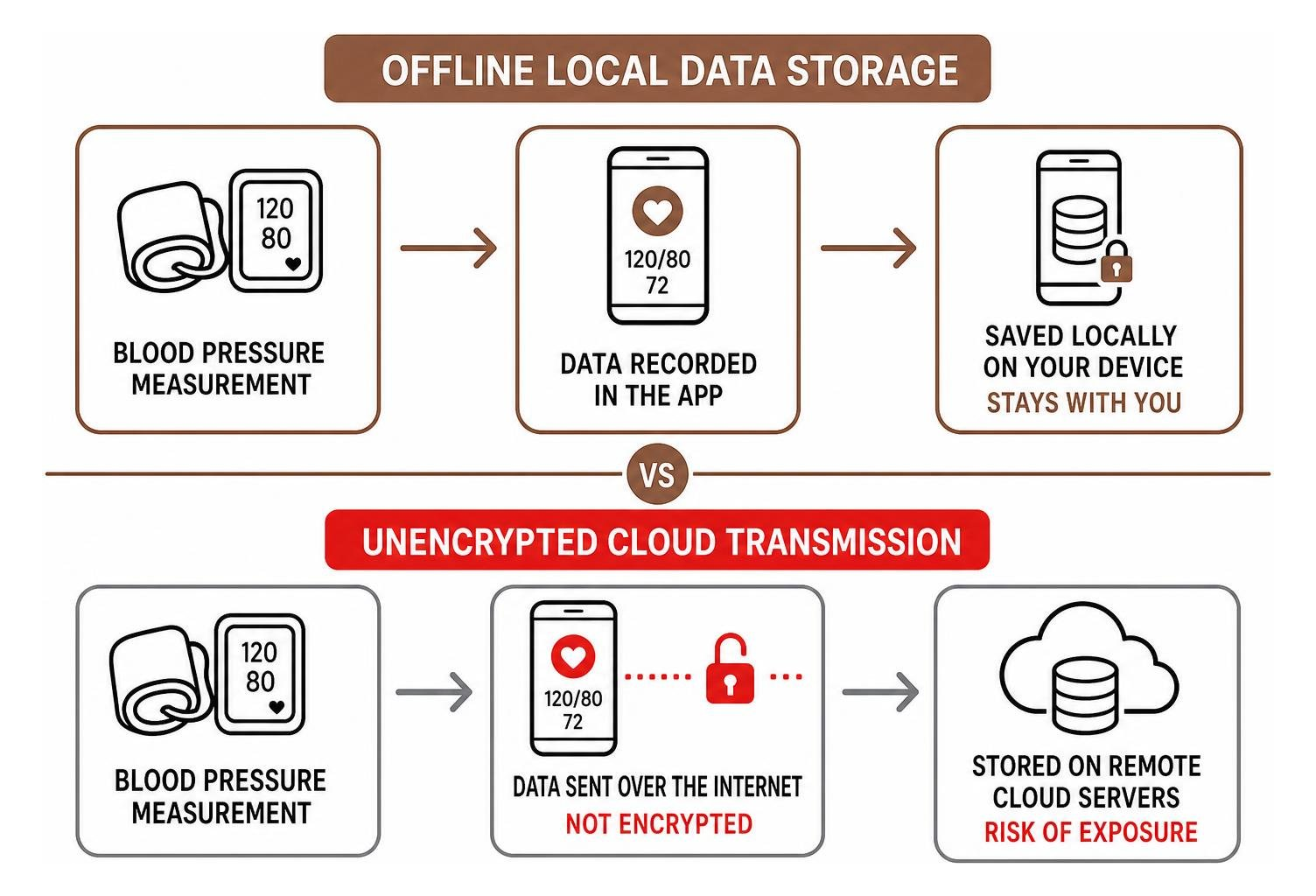
Health metrics are among the most sensitive personal data points you generate. Many free tracking tools monetize user attention through intrusive ad networks or transmit unencrypted vitals to remote third-party analytics servers.
When your medical history is stored on remote servers, it becomes vulnerable to data breaches, tracking, and unwanted profile aggregation. We believe sensitive health metrics should always be private by design.
Opting for an offline-first architecture guarantees that your systolic, diastolic, and pulse logs remain strictly on your local device storage. If an application utilizes cloud syncing, verify that it adheres to strict end-to-end encryption standards, complies with regulations like GDPR or HIPAA, and offers clear options for permanent data deletion.
Can a Mobile App Measure Blood Pressure Without a Cuff?
A common question among smartphone users is whether a mobile application can serve as a standalone blood pressure monitor without requiring any external hardware.
The short answer is no. Current consumer smartphones cannot directly measure arterial blood pressure on their own. While your phone contains sophisticated processors and high-resolution cameras, it lacks the mechanical mechanism required to measure the physical force exerted by circulating blood against your vessel walls.
Optical PPG Sensors vs. Clinically Validated Cuffs
Camera-based measurement utilities rely on optical photoplethysmography (PPG). When you hold your finger over the camera lens and flash, the sensor detects microscopic variations in skin coloration caused by the pulsatile blood volume entering your capillary beds with each heartbeat.
While optical PPG is effective for measuring heart rate and pulse variability, estimating systemic arterial pressure from light absorption alone involves complex algorithmic assumptions. A traditional oscillometric cuff physically inflates to occlude your brachial artery, then measures the actual oscillations of the vessel wall as it deflates.
Pulse wave estimation cannot duplicate the physical occlusion measurement of an arm cuff.
Evaluating Camera-Based Measurement Safety and Risks
Using unvalidated camera apps as diagnostic tools carries significant health risks:
- False Reassurance: An inaccurate camera algorithm might report a normal reading (e.g., 118/76 mmHg) when your actual arterial pressure is dangerously elevated, delaying necessary medical intervention.
- Artificial Anxiety: Inconsistent optical readings caused by poor ambient lighting, cold fingers, or varying fingertip pressure can falsely indicate a hypertensive spike, causing unneeded stress that raises your blood pressure further.
- Regulatory Boundaries: Most camera-based utilities are classified strictly as general wellness tools, explicitly stating in their disclaimers that they are not intended for clinical diagnosis or hypertension management.
Comparing the Best Approaches to Mobile Blood Pressure Tracking
To find the right system for logging your vitals, it helps to understand how different categories of mobile tools approach data capture, connectivity, and privacy.
| Tracking Approach | Best For | Data Storage | Device Sync | Export Options |
|---|---|---|---|---|
| Open-Source Loggers | Privacy purists, technical users | Local on-device only | Manual / CSV import | CSV, PDF, SQLite |
| Manufacturer Ecosystems | Dedicated cuff owners | Cloud account required | Direct Bluetooth pairing | Proprietary PDF / CSV |
| All-in-One Health Journals | Holistic lifestyle tracking | Local or encrypted cloud | Health Connect / Manual | CSV, PDF, Text exports |
| Ad-Supported Free Loggers | Casual quick logging | Mixed (Local + Cloud Ads) | Manual entry | Basic PDF |
For users looking to inspect their tools directly, community-driven projects like open-source repositories provide complete code transparency and zero tracking. Meanwhile, comprehensive utilities offer polished charting, and standard trackers deliver structured logging interfaces.
Setting Up a Mobile App to Monitor Blood Pressure with Bluetooth Monitors
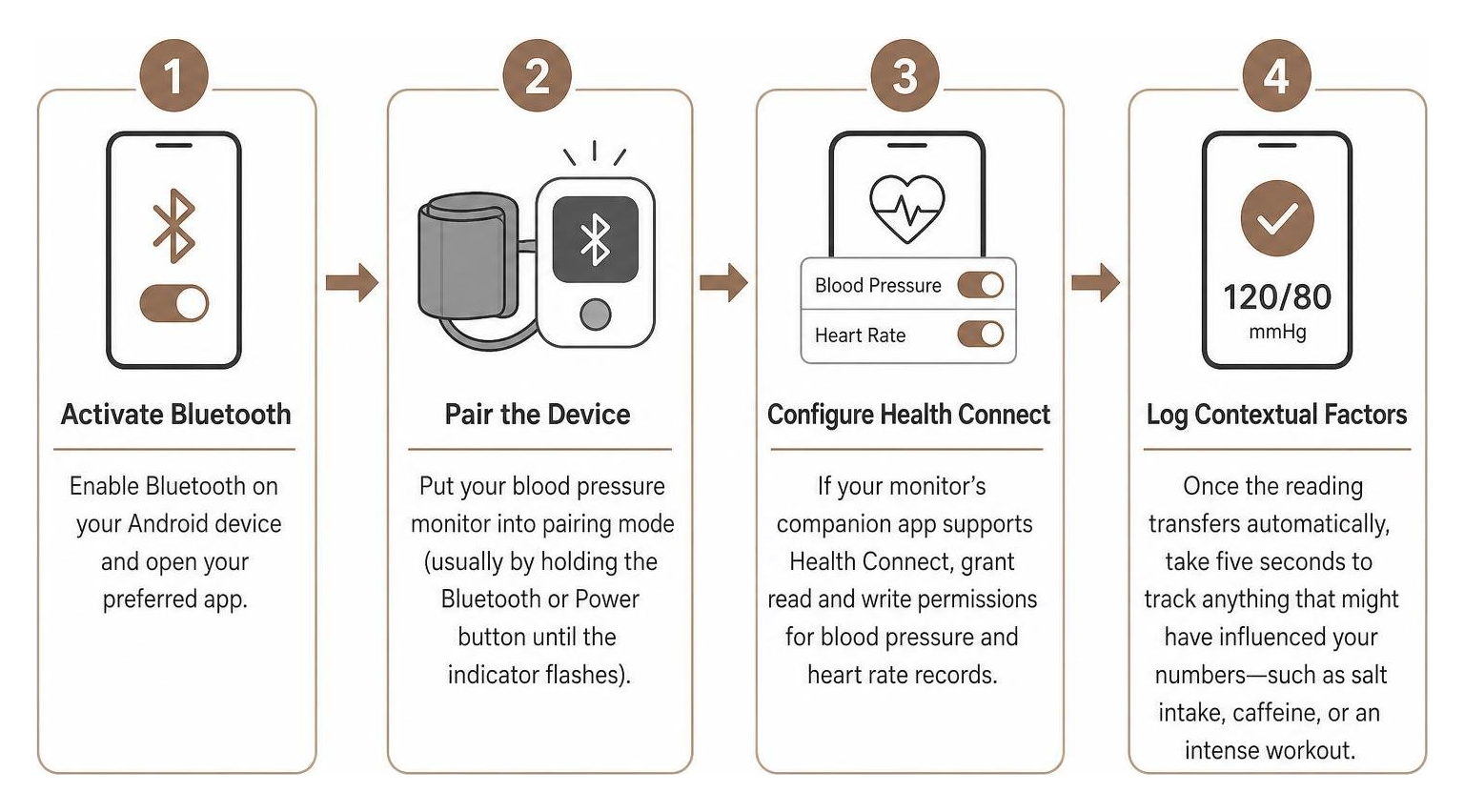
If you use a wireless blood pressure cuff, connecting it to your mobile device streamlines your daily logging:
- Activate Bluetooth: Enable Bluetooth on your Android device and open your preferred tracking tool.
- Pair the Device: Put your blood pressure monitor into pairing mode (usually by holding the Bluetooth or Power button until the indicator flashes).
- Configure Health Connect: If your monitor's companion app supports Health Connect, grant read and write permissions for blood pressure and heart rate records.
- Log Contextual Factors: Once the reading transfers automatically, take five seconds to track anything that might have influenced your numbers—such as salt intake, caffeine, or an intense workout.
Generating Doctor-Ready Reports and Sharing Health Data
The primary goal of maintaining a blood pressure log is providing your physician with an accurate, long-term picture of your cardiovascular health. Single readings taken in a clinical setting are frequently skewed by "white coat syndrome" (temporary spikes caused by clinic anxiety) or "masked hypertension" (normal clinic readings despite elevated home numbers).
When generating an export for your next appointment:
- Filter by Time Range: Select standard clinical windows, such as the past 14, 30, or 90 days.
- Include Calculated Averages: Ensure your summary displays morning versus evening averages separately, as nocturnal blood pressure patterns provide critical diagnostic value.
- Export Standard Formats: Generate clean PDF summaries for quick review during appointments, and export raw CSV files if your doctor uses digital health portals.
Best Practices for Tracking Blood Pressure on Mobile Devices

An app is only as accurate as the data you enter into it. To ensure your digital logs reflect your true cardiovascular state, follow these clinical measurement protocols:
- Rest Before Measuring: Sit quietly in a comfortable chair with back support for at least 5 minutes before pressing start. Avoid talking or looking at stressful notifications during this window.
- Eliminate Common Triggers: Avoid caffeine, tobacco, heavy exercise, and large meals for at least 30 minutes prior to taking a measurement.
- Correct Arm Positioning: Rest your arm on a flat table so that the cuff sits level with your heart. Keep your feet flat on the floor without crossing your legs.
- Take Duplicate Readings: Take two measurements spaced 1 to 2 minutes apart each morning before medication and each evening before dinner. Log the average into your application.
- Add Context Tags: If you had a poor night of sleep, felt stressed at work, or missed a dose of medication, record a tag alongside the numerical values.
Frequently Asked Questions About Blood Pressure Tracking on Mobile Devices
Can my mobile phone measure blood pressure using just the camera?
No. Smartphone cameras cannot physically occlude an artery to measure the pressure of circulating blood. Camera-based optical sensors can estimate pulse rate and analyze blood volume waveforms, but they do not provide clinically validated blood pressure diagnostics. You should always use a validated upper-arm cuff for medical tracking.
How do I sync my blood pressure data with a mobile health data hub?
To sync readings across platforms on Android, install your device's companion software and open Android Settings > Security & Privacy > Privacy > Health Connect. Grant the application permission to write "Blood Pressure" and "Heart Rate" records. Compatible logging apps with read permissions will automatically import those readings.
How can I securely share my blood pressure logs with my doctor?
The most secure way to share your logs is by generating an offline PDF or CSV report directly within your logging app and presenting it during your consultation, or uploading it through your clinic's encrypted patient portal. Avoid sending unencrypted health spreadsheets over public email networks whenever possible.
Conclusion
Managing high blood pressure requires consistent habits, accurate measurement tools, and clear long-term records. While mobile technology makes tracking easier than ever, your phone should serve as the intelligent logbook—not the measuring instrument itself.
By pairing a clinically validated upper-arm cuff with a secure, privacy-focused tracking routine, you can take control of your cardiovascular data without exposing your private health history to third-party ad networks.
If you are exploring broader ways to take charge of your daily routines, nutrition, and vital signs privately, explore our guide to the best health tracker app for Android to build a sustainable, private wellness habit today.