A – Z Guide to Comparing the Best Workout Tracker Apps
Choose a Workout Tracker App That Makes Logging Easy

The best free workout tracker app is one you can log quickly, understand at a glance, and keep using consistently. For strength training, look for routine creation, weight-rep-set logging, rest timers, personal records, progress charts, and custom exercises. If privacy matters, prioritize offline use, local data storage, and export options over social feeds or mandatory accounts.
A good choice should help you answer three simple questions after every session:
- What did I lift today?
- Did I improve from last time?
- What should I do next workout?
The details matter. Beginners may value guided routines and exercise demonstrations. Experienced lifters often need faster entry, previous-session weights, set types, estimated one-rep maxes, volume trends, and RPE or reps-in-reserve notes. Free apps can differ sharply here: some limit routines, history, analytics, or exports behind a subscription.
This guide compares the features, free-tier limits, device support, logging speed, and privacy trade-offs that matter most in 2026. The goal is not to find the app with the most screens. It is to find one that supports progressive overload without adding friction, ads, cloud tracking, or pressure to share every workout.
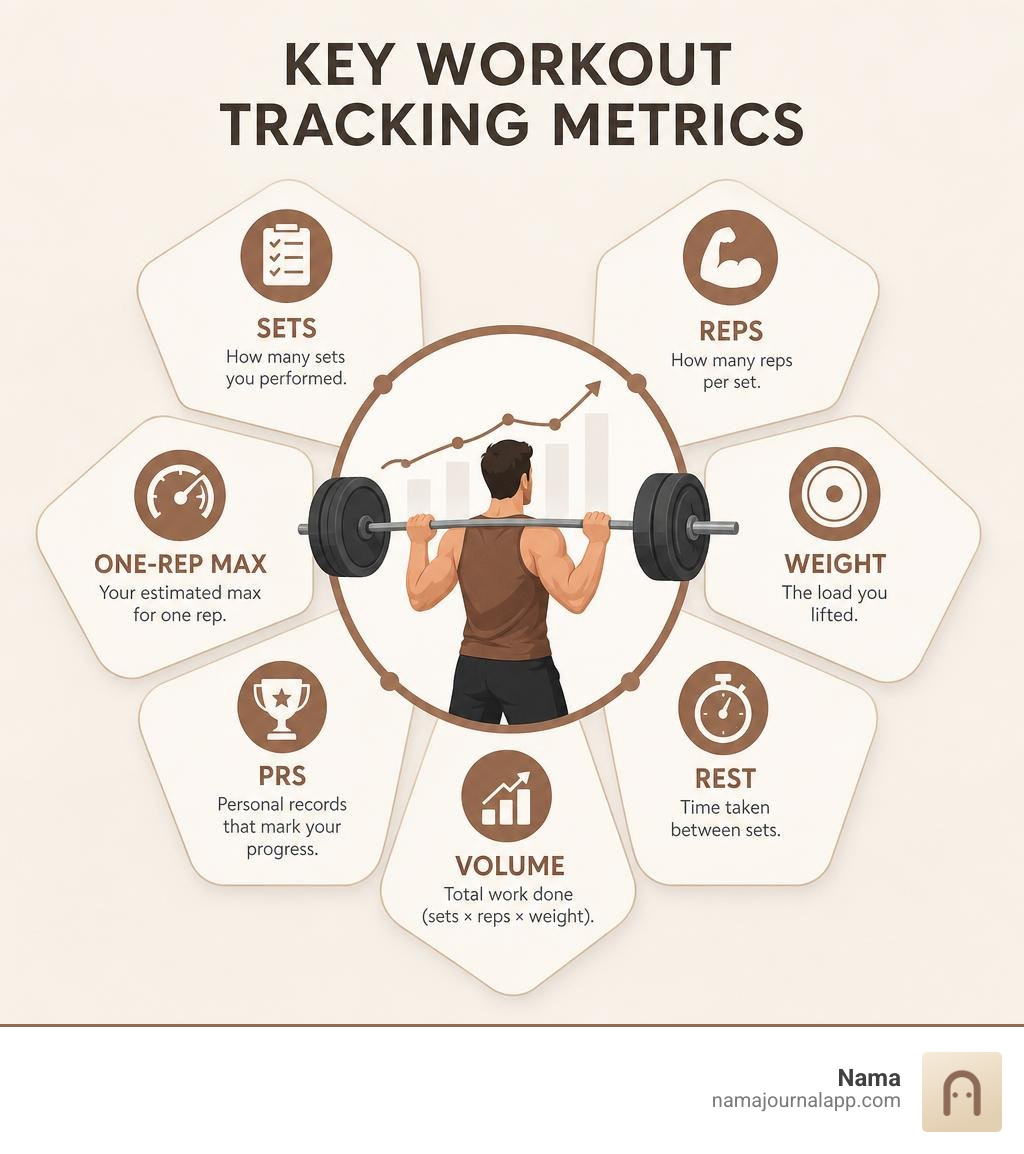
Key Features to Evaluate in a Workout Tracker App
When you step onto the gym floor, the last thing you want is to spend half your rest period wrestling with confusing submenus. An effective gym companion balances deep analytics with extreme simplicity. Whether you are building an upper/lower split, running a push-pull-legs cycle, or following a full-body routine, core features determine whether an app helps your progress or simply gets in your way.
Here are the essential capabilities to look for:
- Intuitive Routine Planning: The ability to map out workout days in advance so you never wander around the gym deciding what equipment to use next.
- Set Tagging Flexibility: Clear designations for warmup, working, drop, and failure sets to keep training intensity organized.
- Automatic Rest Timers: Built-in countdowns that start the second you check off a set, ensuring you maintain consistent workout pacing.
- One-Rep Max (1RM) Estimations: Submaximal calculations that track your theoretical top-end strength over time without requiring dangerous maximal lifts every week.
- Custom Exercise Creation: The freedom to add niche movements, machine variations, and specific equipment setups that are not included in a standard exercise library.
- Historical Benchmarking: Instant visual access to what you lifted last session so you can apply progressive overload accurately.
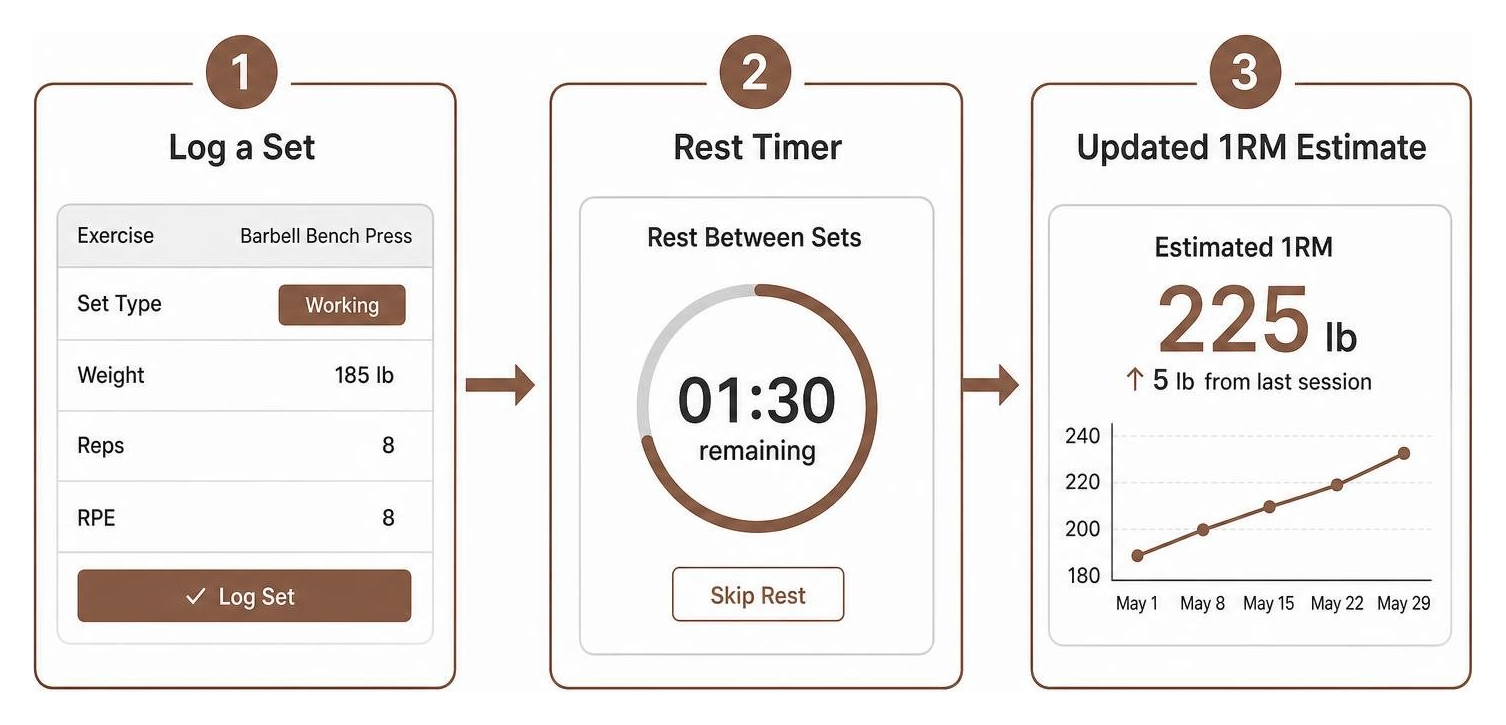
Rest Timers, Set Tagging, and Progressive Overload Tracking
Progressive overload is the foundation of muscle hypertrophy and strength gains. To ensure you are progressing over weeks and months, your log must capture more than just raw reps and pounds.
Tagging sets accurately changes how you interpret your data. A warmup set of five reps at 135 pounds should not skew your working volume or trigger an artificial personal record. Similarly, logging a drop set or a set taken all the way to absolute failure helps explain performance fluctuations across subsequent exercises.
Tracking Rate of Perceived Exertion (RPE) and Reps in Reserve (RIR) gives you immediate context on your physical fatigue. For example, lifting 200 pounds for 8 reps at RPE 8 (2 reps left in the tank) represents better baseline strength than lifting that same 200 pounds for 8 reps at a grinding RPE 10. Reviewing our Weekly Exercise Log Tips 2026 can help you structure these intensity markers across multi-week training blocks.
Hardware Ecosystems: Wearables, Smartwatches, and Desktop Logging
Gym setups vary wildly. Some lifters prefer leaving their phone tucked securely inside a locker, tracking their entire session directly from an Apple Watch or Wear OS device. Others enjoy planning complex, multi-week mesocycles from a full-sized desktop keyboard before syncing those routines to their mobile app.

When evaluating hardware support, consider whether a wearable app functions as a true standalone logger or merely acts as a remote mirror for your smartphone. A standalone wearable tool lets you record sets, trigger rest vibration alerts, and log weights offline in airplane mode. Meanwhile, desktop interfaces provide a broader canvas for reviewing long-term volume graphs, editing custom splits, and analyzing multi-month training trends.
Comparing Free vs Subscription Models in Modern Gym Loggers
Monetization models in fitness software have evolved significantly. While many tools claim to be free on app stores, their functional utility often relies on whether core strength features sit behind a subscription paywall.
Some platforms offer generous free tiers that include unlimited routine creation and complete historical data, while others limit unpaid users to three saved templates or lock historical progress charts after a few weeks. Below is an overview of how typical free tiers stack up against premium tiers across modern strength tracking utilities:
| Feature Capability | Standard Free Tier | Typical Premium / Subscription Tier |
|---|---|---|
| Routine Creation | Often capped at 3–4 routines | Unlimited custom routines & splits |
| History & Log Access | Last 1–3 months of workout history | Complete lifetime workout history |
| Rest Timers & Alarms | Basic manual timer | Auto-starting rest timers with haptic alerts |
| Analytics & Charts | Basic bar charts for recent workouts | Advanced 1RM trends, volume curves, & muscle split breakdowns |
| Data Export | Sometimes blocked or limited to CSV summaries | Full database backup & raw data export |
| Custom Exercises | Limited to 5–10 custom movements | Unlimited custom exercises with video/notes |
| Offline Privacy | May require mandatory account registration | Local backup, offline sync, or cloud storage |
If you prefer building a personalized dashboard without artificial restrictions, you can track anything from strength metrics to recovery habits using tools built on open, flexible logging frameworks.
How to Choose a Workout Tracker App for Beginners vs Advanced Lifters
A lifter walking into the gym for the first time has completely different needs than a powerlifter peaking for a meet.
For beginners, visual guidance is essential. Having integrated video demonstrations, posture cues, and pre-built starter routines—such as classic 3-day full-body or introductory upper/lower splits—eliminates the intimidation of navigating unfamiliar gym equipment. Beginners benefit from apps that automatically suggest baseline weights and provide clear rest countdowns to establish sustainable workout habits.
Advanced lifters, on the other hand, rarely need form videos for standard barbell compound lifts. Instead, they require granular periodization controls, superset grouping, drop-set flags, and flexible RPE/RIR tracking. For advanced trainees, speed is paramount: the interface must allow them to adjust weights on the fly, swap exercises if a squat rack is occupied, and quickly review historical rep records at specific weights.
Speed and Logging Friction in a Workout Tracker App
Every extra tap required to record a set breaks your focus between heavy lifts. In-gym logging friction is one of the primary reasons lifters abandon digital workout tracking and return to physical notebooks.

High-efficiency workout apps eliminate unnecessary inputs through thoughtful design:
- Custom Numpads: Purpose-built numeric keypads that load instantly without triggering the bulky standard OS keyboard.
- Auto-Prefill: Automatically pulling forward the exact weights and rep targets used during your previous workout session.
- One-Tap Duplication: Quick-copy buttons that allow you to check off straight sets with a single tap.
- Single-Screen Logging: Keeping exercise history, set inputs, notes, and rest timers all visible on a single unified interface.
Data Privacy, Offline Usability, and Habit Integration
Gyms are notoriously difficult environments for internet connectivity. Basement powerlifting gyms, metal-clad warehouse facilities, and parking-garage fitness centers often suffer from weak cellular reception. If an app requires an active server connection just to check off a set or look up your previous bench press weight, it will quickly become frustrating to use.
Local on-device data storage guarantees that your logs are always accessible, whether you are training in an offline basement or traveling in airplane mode. Beyond reliability, local storage offers superior data privacy. When your health data remains stored directly on your personal device without mandatory accounts or remote cloud processing, you maintain total ownership of your fitness logs.
True fitness progress does not happen in isolation. Your strength gains are directly influenced by sleep, nutrition, and daily consistency. Combining your workout logs with a daily weekly monthly habit tracker app helps you see the bigger picture of your overall wellness. If you are exploring cross-platform options, reviewing the best health tracker app for Android can provide insight into how different ecosystems manage local permissions and health data aggregation.
Frequently Asked Questions about Workout Loggers
Can you log strength workouts completely offline?
Yes. Dedicated offline workout loggers store all exercise databases, routine templates, and historical logs locally in an on-device database on your smartphone or wearable. This ensures that every feature—from customized rest timers to previous-weight lookups—works without an active Wi-Fi or cellular connection.
How do gym apps calculate estimated one-rep max?
Most gym tracking tools use established submaximal formulas, such as the Brzycki, Epley, or Lombardi equations, to estimate your theoretical 1RM:
By analyzing submaximal working sets (for example, lifting 225 lbs for 5 reps), the app calculates your estimated maximal capacity without requiring you to perform a high-risk, true one-rep max test.
What is the advantage of tracking RPE and RIR?
Tracking Rate of Perceived Exertion (RPE) and Reps in Reserve (RIR) allows you to quantify how close a set was to muscular failure. This prevents "junk volume" by ensuring that working sets are performed at an effective intensity, while helping you manage central nervous system fatigue across demanding weekly training splits.
Conclusion
Building long-term strength comes down to sustainable progressive overload, reliable tracking, and consistent effort. The ideal logging tool should simplify this process, providing quick data entry, clear historical benchmarks, and distraction-free operation during every workout session.
At Nama, we believe your personal health and fitness data belongs solely to you. We designed Nama as a completely private iOS wellness journal that lets you record your exercise log, daily meals, personal reflections, and custom health metrics entirely on your iPhone. With our offline, no-account architecture, your workout and wellness history stays secure, accessible, and fully exportable whenever you need it.