Best Apps That Count Steps to Hit Your Daily Fitness Goals
Best Apps That Count Steps for Your Daily Goals
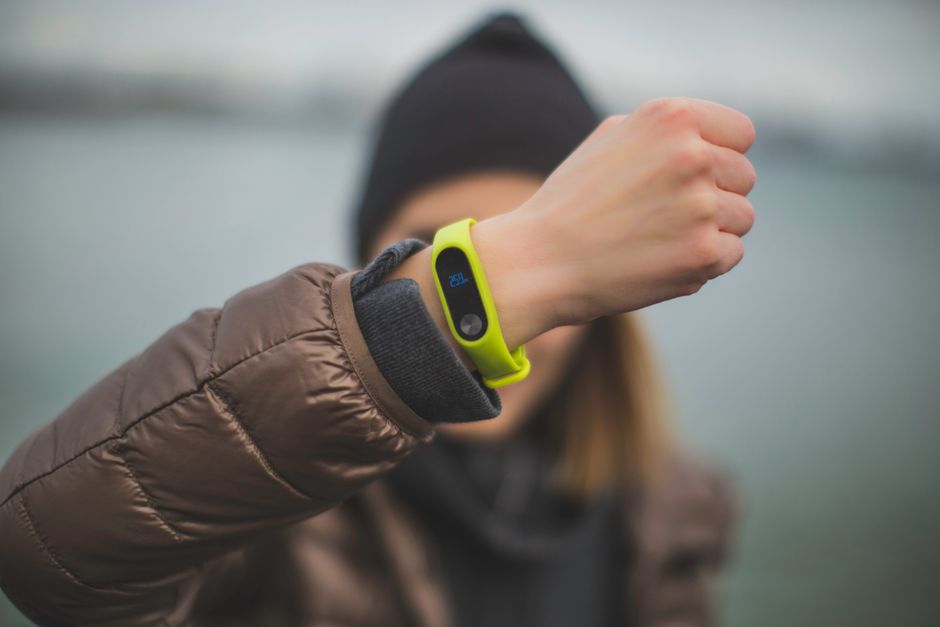
The best apps that count steps depend on what keeps you walking. For simple tracking, start with your phone’s built-in health app or a free, sensor-based pedometer. For motivation, look for daily goals, streaks, or friend challenges. If you use a smartwatch, check that the app can import its step data.
Try the free version first. A good step counter should be easy to read, work when you’re offline, and avoid draining your battery. Check its ads and privacy settings before you commit.
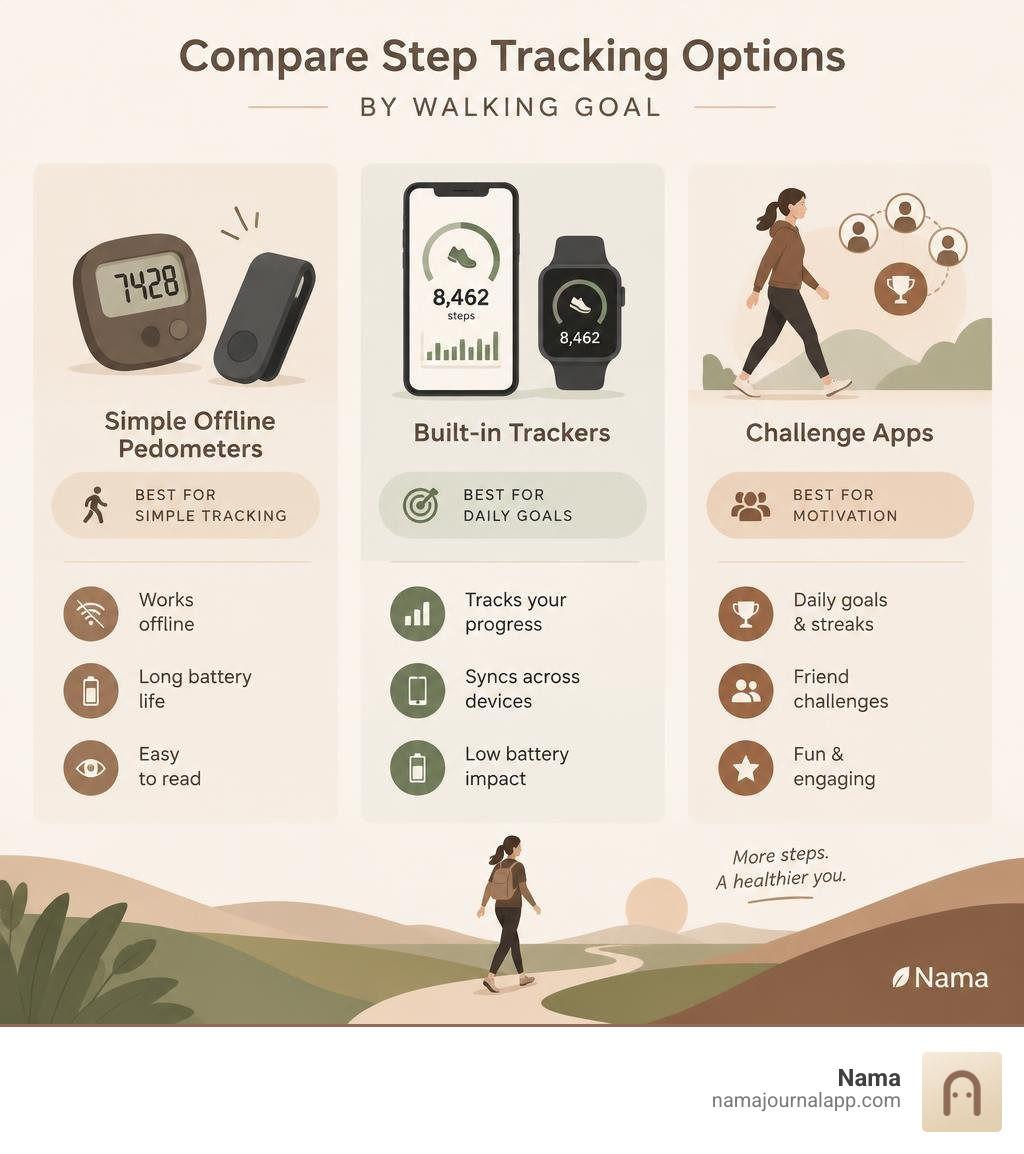
Key apps that counts steps vocabulary:
How Smartphone Step Trackers Work and Calculate Movement
Smartphones are equipped with built-in hardware that detects movement. The core of this system is the three-axis accelerometer, a micro-electro-mechanical sensor that measures acceleration forces along the X, Y, and Z axes. Whenever your body moves forward, your foot strikes the ground and creates a distinct peak in vertical and forward acceleration.
The device combines accelerometer data with gyroscopes—which measure orientation and rotation—to differentiate between genuine walking steps, random hand gestures, driving in a car, or bouncing in an elevator. Modern step-detection algorithms filter these signals through thresholding and pattern recognition. When the rhythmic acceleration matches human walking cadences, the software registers a step.
Research shows that modern phone sensors are remarkably reliable during regular movement. Dedicated scientific studies, including the How Well iPhones Measure Steps in Free-Living Conditions: Cross-Sectional Validation Study, demonstrate that pocket-carried smartphones record steps with a high degree of precision across everyday walking conditions.
How Modern Apps That Count Steps Track Distance and Calories
Counting footsteps is only part of the equation. Most walkers also want to know total distance and energy expenditure. Step trackers estimate distance by multiplying your total step count by your estimated stride length.
Unless manually calibrated, applications estimate your stride length using your height and biological sex, typically assuming stride length is roughly 41% to 45% of your total body height.
Calculating energy expenditure requires another layer of data. Applications estimate active calorie burn by combining your basal metabolic rate (BMR)—derived from your age, sex, height, and body mass—with the metabolic equivalent of task (MET) values for walking speed:
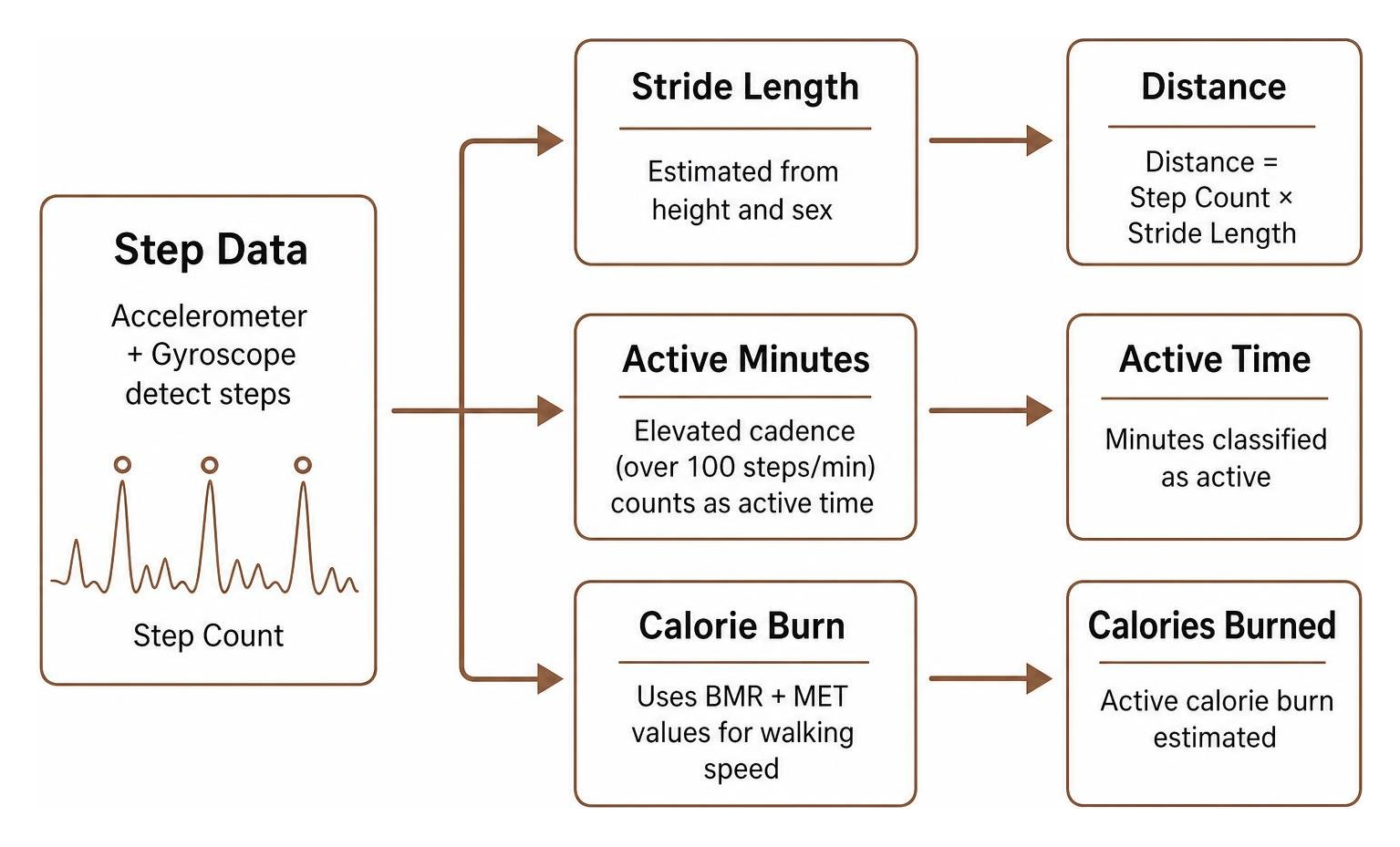
When an app detects an elevated cadence (such as brisk walking at over 100 steps per minute), it classifies those minutes as "active time" and scales caloric output accordingly. If you want a deeper look at balancing daily activity with nutrition, using a dedicated calorie and step tracker provides a clear picture of total daily energy balance.
Sensor-Based Tracking vs. GPS Distance Monitoring
When evaluating tracking apps, understanding the difference between motion-sensor detection and GPS tracking helps you balance accuracy and battery health.
- Sensor-Based Tracking (Inertial Pedometer): Relies entirely on the phone's internal accelerometer and step coprocessor.
- Pros: Consumes negligible battery (often under 2% per day), works completely offline, and operates indoors on treadmills or in shopping centers.
- Cons: Stride length variations during steep climbs or slow browsing can slightly skew total calculated distance.
- GPS Distance Monitoring: Employs satellite triangulation to map exact geographic coordinates over time.
- Pros: Delivers precise route mapping, elevation changes, and exact outdoor distance.
- Cons: Heavy battery consumption, privacy exposure from recorded location histories, and total failure when walking indoors or through deep urban canyons.
For everyday step tracking, sensor-based background counting is the superior and most battery-friendly choice.
Key Features to Compare in Apps That Counts Steps
With hundreds of pedometers on the market, choosing the right tool comes down to core functionality, user interface design, and how the app handles your personal information.
Core Features in Free vs. Premium Apps That Count Steps
Many basic step counters offer functional free tiers supported by advertisements, while others lock advanced analytics behind monthly or yearly subscriptions.
| Feature Category | Standard Free Tier | Premium / PRO Version ($19.99–$32.99/yr) |
|---|---|---|
| Step Tracking | Real-time daily steps, distance, active time | Real-time tracking + historical cadence data |
| Advertisements | Banner ads and full-screen interstitials | 100% ad-free interface |
| Data Analytics | Daily and 7-day trend summaries | Lifetime trends, hourly breakdowns, exportable CSVs |
| Habit Tools | Basic daily step goal | Custom goals by day of week, streak freezes |
| Workout Logging | Automatic passive step counting | GPS route tracking, split times, heart rate overlays |
| Personalization | Default interface theme | Custom app icons, accent colors, custom widgets |
Upgrading to a PRO subscription is generally worth considering if you want to eliminate distracting full-screen ads, require CSV data exports for personal records, or want advanced streak-protection features. If your primary goal is checking your daily step total before bed, a clean, sensor-based free app or a privacy-oriented step counter app handles the task without recurring costs.
Privacy Standards and Health Platform Integration
Health information is sensitive personal data. Step counters track when you wake up, when you leave the house, and your general activity patterns. When reviewing an app's privacy policy, verify whether the software stores data locally on your device or transmits identifiers and behavioral metrics to third-party ad brokers.
A high-quality step tracker should integrate smoothly with central OS health platforms:
- Apple Health (HealthKit) for iOS users
- Health Connect / Google Fit for Android users
These system-level frameworks let you aggregate activity from smart rings, fitness watches, and phone sensors in one central place. If you enjoy logging qualitative notes alongside your physical movement, tracking custom metrics with dedicated custom metric features gives you complete control over your health history without sacrificing personal privacy.
Best Types of Step Trackers for Different Fitness Lifestyles

No single step counter fits every routine. Matching the software to your daily habits ensures you stay engaged without feeling overwhelmed by complex fitness metrics.
Gamified Challenges, Social Leagues, and Rewards
For many walkers, internal motivation is boosted by external accountability and friendly competition. Social step tracking apps use gamification to keep you moving:
- Friend Leaderboards and Team Challenges: Platforms that let you invite family, friends, or coworkers via a simple link create mutual accountability. Research confirms that people with social accountability exercise 30% more consistently.
- Charity-Linked Walking: Charity-focused step trackers turn physical movement into social good. By partnering with corporate sponsors, milestones of daily steps walked trigger donations to causes like clean water, animal welfare, and children's education, doubling that impact during active workouts.
- Real-World Discounts and Rewards: Reward-based step programs convert verified steps into digital perks and reward points that can be redeemed for retail discounts, sustainable goods, and wellness products.
- Virtual Adventures: Programs that map your real-world neighborhood steps onto digital journeys through national parks or historical landmarks provide a rewarding sense of progression.
Selecting the Right Apps That Count Steps for iPhone and Android
Operating system architecture plays an important role in step-counting accuracy and battery management:
- For iPhone Users: iOS handles background motion counting exceptionally well through the built-in M-series motion coprocessor. Look for apps that support Lock Screen widgets, Interactive Home Screen widgets, and Apple Watch complications for quick glanceability.
- For Android Users: Android devices vary widely by manufacturer (Samsung, Google Pixel, Xiaomi). Because aggressive background battery optimization can sometimes shut down step counters unexpectedly, choose apps that allow you to adjust sensor sensitivity, whitelist background processes, or link directly into Android's unified Health Connect framework. For a deeper breakdown of device-specific options, explore our guide on finding the best health tracker app for android.
The Science of Daily Step Goals and Habit Formation
Walking is among the most accessible and effective forms of preventative healthcare. While the classic "10,000 steps a day" benchmark originated as a 1965 marketing campaign for a Japanese pedometer, modern epidemiological studies confirm that substantial health gains begin at much lower thresholds.
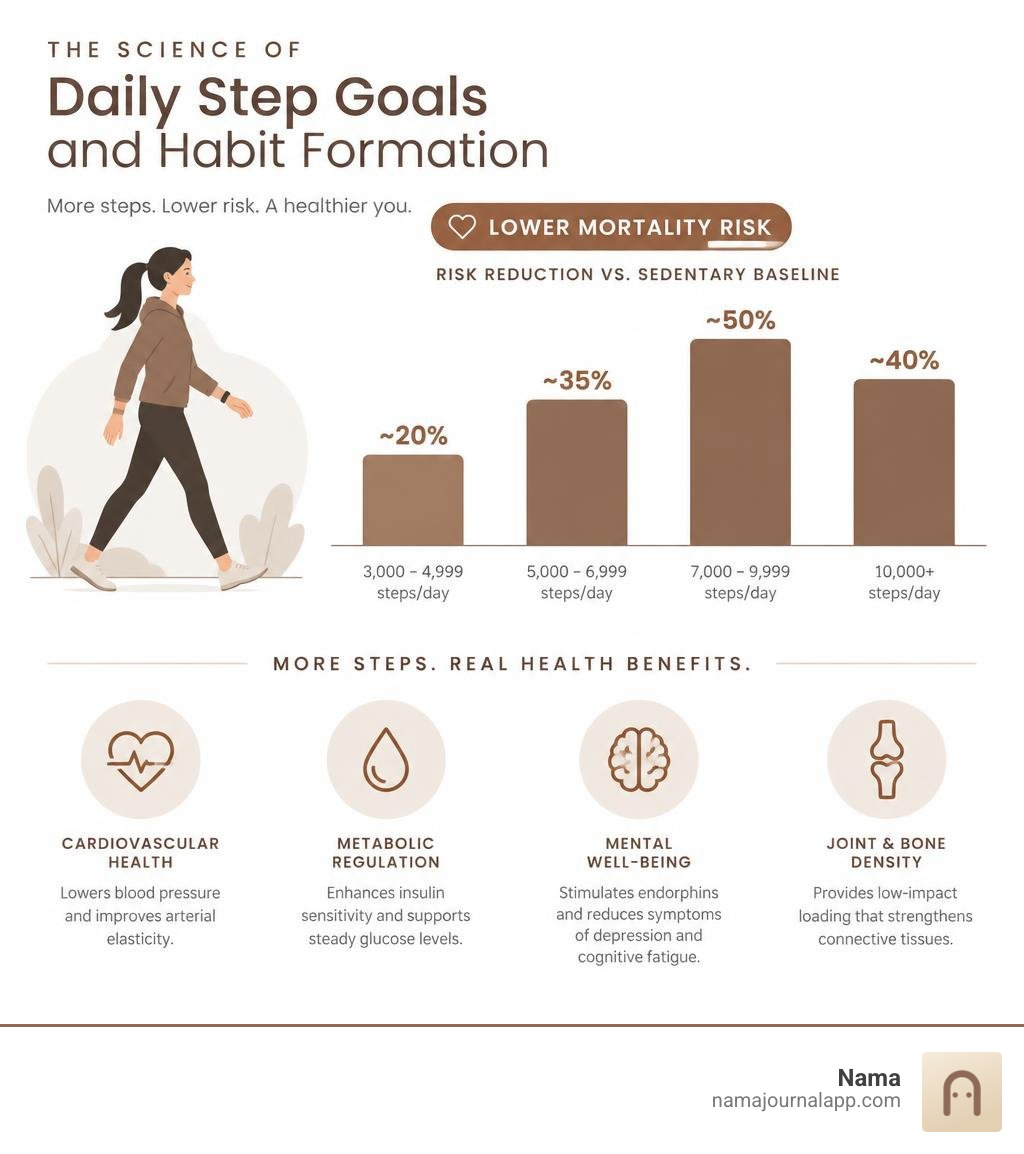
Clinical research reveals that taking approximately 7,000 steps per day can reduce the risk of premature all-cause mortality by up to 50% compared to sedentary baselines (under 3,000–4,000 daily steps). Regular walking also delivers measurable improvements in:
- Cardiovascular Health: Lowers resting blood pressure and improves arterial elasticity.
- Metabolic Regulation: Enhances insulin sensitivity and assists in steady glucose clearance after meals.
- Mental Well-Being: Stimulates natural endorphin release, lowering symptoms of depression and cognitive fatigue.
- Joint and Bone Density: Provides low-impact loading that strengthens connective tissues without overstressing cartilage.
Building Long-Term Consistency with Streaks and Visual Feedback
Starting a walking routine is simple; sustaining it for months requires habit reinforcement. Behavioral science demonstrates that people who actively track their physical fitness routines are 27% more likely to maintain consistency, while clear visual progress tracking increases workout adherence by up to 35%.
Most people require 4 to 6 weeks of consistent activity before noticing measurable body composition and endurance changes. To stay consistent:
- Maintain Visual Streaks: Tracking consecutive days of meeting a baseline goal (such as 6,000 steps) builds positive psychological momentum.
- Set Tiered Daily Targets: Establish a "baseline goal" for busy days and an "aspirational goal" for active weekends.
- Use Midday Prompts: A gentle notification at 2:00 PM reminding you that you are 2,500 steps away from your target makes an evening walk feel achievable.
Avoiding Common Tracking Pitfalls and Syncing Glitches
To keep your daily step counts accurate and prevent common technical frustrations:
- Pocket vs. Bag Placement: Carrying your phone in a loose purse, backpack, or stroller pocket can dampen motion detection, leading to missed steps. Keep the device in a snug pants pocket for optimal recording.
- False Driving Steps: Bumpy car rides or public transit can occasionally register as steps. Choose apps that let you pause background tracking or adjust motion sensor sensitivity.
- Sync Delays with Wearables: If an app syncs through Apple Health or Health Connect, it may reconcile step totals only once every few hours rather than live. Disabling external cloud sync forces some apps to read directly from internal sensors for real-time totals.
Frequently Asked Questions About Step Counting Apps
Do step counting apps drain smartphone battery quickly?
Standard sensor-based step counters consume very little power—often less than 2% of total battery per day. They read data from the phone's low-power motion coprocessor rather than running active calculations. However, if an app continuously runs active GPS location tracking in the background, battery drain increases significantly.
Can step tracking apps count steps accurately without internet or Wi-Fi?
Yes. Accelerometers and motion sensors are hardware components built into your phone that operate entirely without cellular service, Wi-Fi, or GPS. You can walk offline in airplane mode or on remote trails, and the app will accurately record every step. Any optional cloud backups or social leaderboards will update once you reconnect.
How accurate are smartphone step counters compared to fitness smartwatches?
Smartphones and wrist-worn fitness trackers show comparable accuracy for steady, brisk walking when the phone is held in a front pants pocket. Smartwatches are better at capturing household steps (such as pacing around a kitchen or folding laundry), whereas phone sensors avoid "false steps" caused by hand gestures, typing, or washing dishes.
Conclusion
Hitting your daily movement targets does not require complicated workout regimens or expensive gym equipment. By finding a reliable step counter that matches your lifestyle—whether you want gamified social challenges, simple offline pedometer charts, or charity-driven walking—you can turn everyday movement into sustainable wellness habits.
If you prefer keeping a mindful, holistic record of your daily activity, nutrition, and wellness without third-party trackers or cloud syncing, pair your walking routine with our private, offline exercise log. Tracking your daily journey should be rewarding, simple, and entirely your own.