The Best Apple Watch Apps to Track Weight Lifting Without Touching Your Phone
Find the Best Apple Watch App for Weight Training
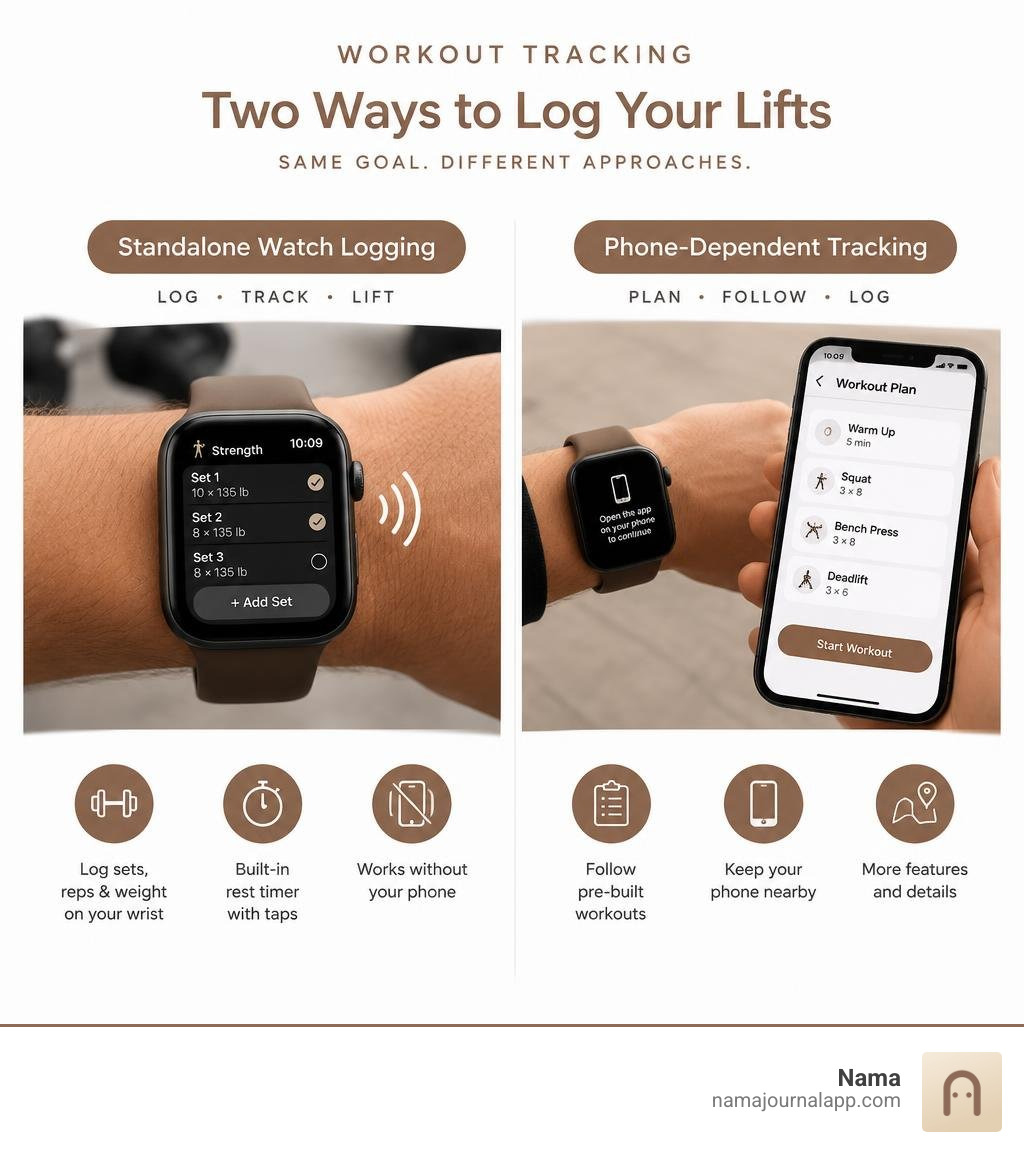
For most lifters, the best apple watch app for weight training is one that lets you log sets, reps, and weight on your wrist without an iPhone nearby. Look for quick set entry and a rest timer that taps your wrist. If you need someone to plan your workouts, choose a guided app instead of a simple logger.
The key test is practical: Can you finish a full lifting session with your phone in your locker? The roundup below helps you find the right fit.
Best apple watch app for weight training terms to remember:
What Defines the Best Apple Watch App for Weight Training?
The difference between a great wrist workout and a frustrating gym session comes down to ergonomics and independence. We have all experienced the headache of balancing a heavy barbell, chalk-covered hands, and a giant glass phone screen between sets. A truly dedicated watch companion shifts that burden entirely to your wrist.
To build an efficient training rhythm, your wearable tool must excel across several distinct criteria:
- Complete Standalone Functionality: The ability to run full routines, adjust loads, and store sessions without maintaining an active Bluetooth link to an iPhone.
- Frictionless Set Entry: Large touch targets designed for quick taps while your heart is racing and hands are trembling.
- Persistent Background Execution: Timers and tracking active states that do not reset or crash when the screen sleeps.
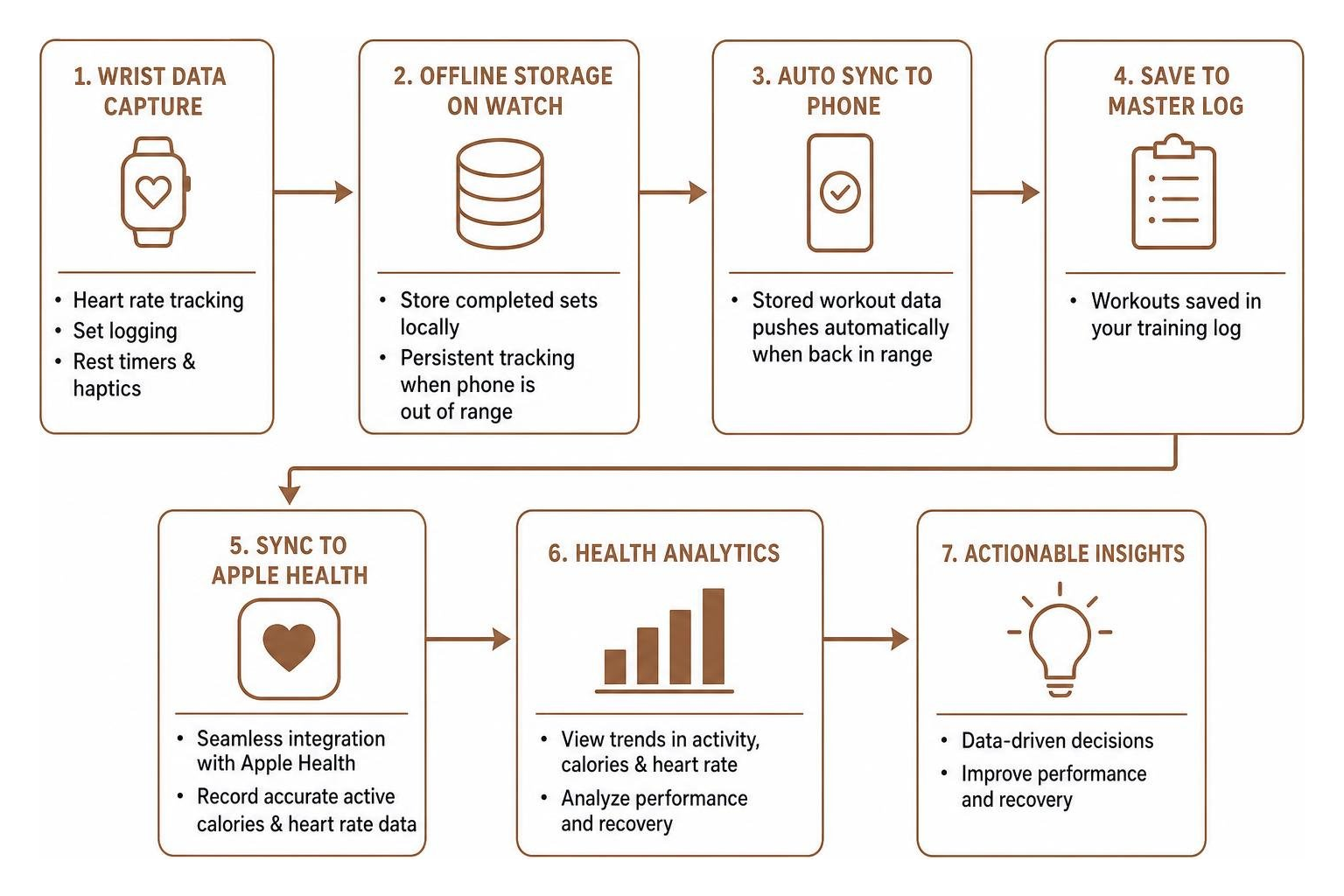
- Actionable Biometric Sync: Seamless integration with Apple Health to record accurate active calories and heart rate data.
Intentional interface design is a common trait of effective fitness software. If an app requires you to navigate three sub-menus just to mark a set of squats as complete, it fails the gym-floor test. As detailed in our comprehensive workout tracker app ultimate guide 2026, true workout utility is measured by how quickly the technology gets out of your way.
Why the Best Apple Watch App for Weight Training Must Work Standalone
Leaving your phone in the locker room changes your mental focus during a heavy session. Without notifications, social feeds, or messages competing for your attention, workout density improves naturally. However, this setup demands rock-solid offline execution from watchOS.
When your watch loses connection with your phone, the app must store your completed sets locally in its cache. Top-performing standalone applications continuously log biometrics without dropping samples. Research reveals that Apple Watch optical heart rate tracking maintains a low mean error rate of just 4.43%. This makes the sensor reliable for calculating recovery capacity between intense bouts—provided the app does not stall while managing local memory. Once you step back into range of your locker, your stored workout data should push seamlessly to your master log without manual intervention.
Set Logging Speed and Rest Timer Haptics
Every extra second spent tapping a miniature screen adds unnecessary friction to your session. The most efficient logging experiences rely on streamlined numeric selectors or Digital Crown scrolling to adjust weight and rep values in three quick taps or fewer.
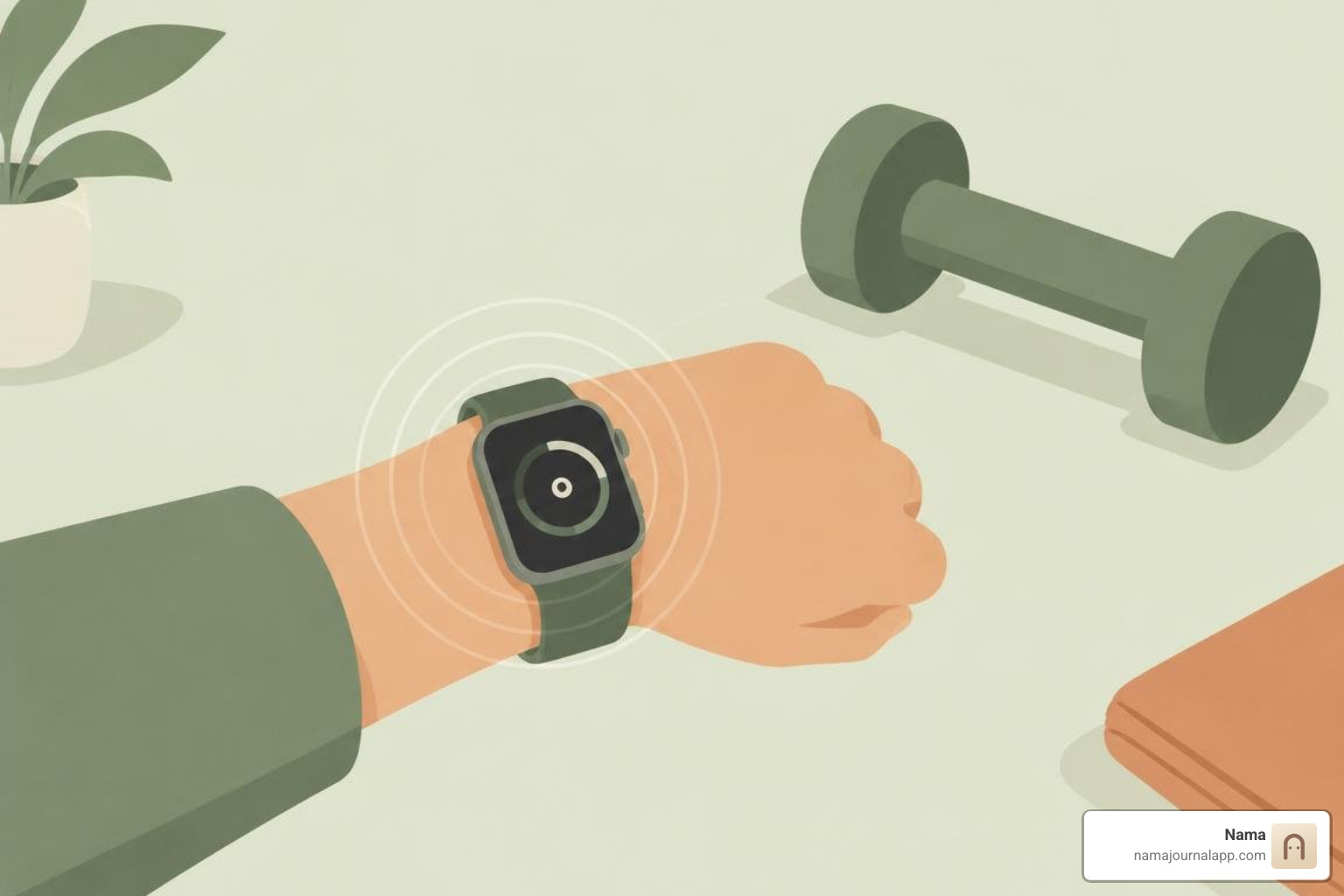
Haptic feedback plays a crucial role here. Instead of constantly checking a stopwatch or watching a countdown screen, a series of distinct wrist pulses alerts you when your recovery window closes. This tactile cue allows you to focus on mental preparation, chalking up, and stepping up to the barbell exactly when your designated rest period concludes.
Core Features for Tracking Lifting Sessions from Your Wrist
Reliable Apple Watch training tools make good use of battery controls and Digital Crown support. Choosing a dedicated best weight training tracker ensures your wearable actively supports your long-term lifting goals.
Default Watch Workout Tool Limitations for Strength Training
The default watch workout tool handles cardio, cycling, and running exceptionally well, but it falls short when applied to serious resistance training. When you select Traditional Strength Training on watchOS:
- It tracks total elapsed time.
- It measures continuous heart rate.
- It estimates active calorie expenditure.
What it completely ignores is the core driver of muscular adaptation: progressive overload. The default workout tool offers no fields to record lifted weight, completed repetitions, warm-up designations, or target sets. There is no integrated plate calculator and no rest interval pacing tied to specific compound movements. Maintaining an organized exercise log requires dedicated software that tracks physical loads, not just cardiovascular strain.
Automatic Rep Counting vs. Manual Set Logging
Several applications attempt to leverage the watch's internal gyroscope and accelerometer to detect repetitions automatically. While this sounds convenient on paper, practical gym use reveals significant limitations.
Motion sensors excel at repetitive, single-plane exercises with uniform cadences, such as standard dumbbell curls or machine presses. However, they struggle with complex compound lifts. Paused squats, varying barbell paths, isometric holds, or chaotic movements cause sensor algorithms to miscount reps or log false positives when you are merely adjusting your grip. Voice logging shortcuts offer an alternative hands-free approach, yet background gym music and surrounding noise cause voice recognition to fail roughly 10% of the time.
For consistent lifters, a rapid manual entry interface—confirming a pre-filled target set in 2 to 3 seconds—remains vastly more accurate and reliable than automatic detection algorithms.
Minimalist Workout Trackers vs. Guided Workout Programmers
Lifting apps broadly divide into two functional camps: lightweight loggers designed for self-directed athletes, and structured platforms that prescribe specific sets, reps, and weights.
Selecting the right category depends on whether you follow an established strength routine or prefer real-time algorithmic coaching delivered to your wrist. A dedicated bodybuilding workout tracker prioritizes rapid volume calculation, whereas an adaptive coaching platform recalibrates prescribed working weights based on your rate of perceived exertion.
| Feature Category | Minimalist Set Loggers | Guided Workout Programmers |
|---|---|---|
| Primary Focus | Frictionless set & rep capture | Algorithmic progression & coaching |
| Watch Autonomy | High (100% offline standalone) | Moderate to High (Requires pre-sync) |
| Typical Battery Drain | 5% to 8% per 60 min | 8% to 15% per 60 min |
| Logging Speed | 2 to 3 taps per set | Interactive guided prompts |
| Best For | Self-programmed lifters & powerlifting | Beginners & structured periodization |
Selecting the Best Apple Watch App for Weight Training Based on Your Routine
Your specific training style determines your ideal app profile:
- Powerlifting and Barbell Athletes: Require percentage-based training inputs, customizable rest timers up to five minutes, RPE scoring, and support for heavy compound movements without intrusive visual animations.
- Hypertrophy and Bodybuilding: Demand precise weekly volume tracking across specific muscle groups, superset navigation, and automated drop-set tagging.
- Hybrid Athletes: Require platforms that balance heavy strength work with running and conditioning metrics, preventing overtraining by tracking cumulative cardiovascular and muscular stress.
Sports science research published in the British Journal of Sports Medicine consistently highlights that pairing resistance training with cardiovascular work yields superior health markers compared to either modality alone. Ensuring your chosen tracking framework accurately records muscular intensity alongside aerobic demands keeps your training balanced.
Long-Term Data Export and Privacy Considerations
Your training history represents months or years of disciplined effort. Relying on platforms that trap your workout logs inside proprietary cloud servers introduces unnecessary risk. If a service changes its subscription model, shuts down, or suffers server outages, your personal PR history and volume trends could vanish.
Prioritize systems that offer local data control and standard CSV or JSON file exports. Maintaining local ownership of your wellness records guarantees that your workout logs, health metrics, and personal training notes remain private, secure, and accessible indefinitely.
Frequently Asked Questions About Smartwatch Weight Tracking
Can You Track Sets and Reps Directly on Apple Watch Without an iPhone Nearby?
Yes. Dedicated strength applications store workout routines within local watchOS memory. You can initiate your session, adjust weights, check off completed reps, and utilize haptic rest intervals while your phone sits locked in a gym locker. Once your watch reconnects to your primary device over Bluetooth or local Wi-Fi, the cached session data syncs automatically with your health database.
How Much Apple Watch Battery Does a 60-Minute Lifting Workout Consume?
A standard 60-minute strength session typically consumes between 5% and 10% battery life on modern hardware (such as Apple Watch Series 9 or Ultra 2). The primary power draw stems from continuous optical heart rate monitoring and keeping the display active. Streamlined apps that use dark backgrounds and avoid heavy 3D rendering consume closer to 5% to 8% per hour, while apps rendering complex movement animations drain upwards of 12% to 15%.
Does the Apple Watch Accurately Count Reps Automatically During Weight Training?
Automatic rep detection remains inconsistent across varied gym movements. While the watch’s internal accelerometers accurately track standard arm-driven isolation lifts, they struggle to differentiate between a reset pause and a completed rep during deadlifts, squats, or overhead presses. Manual tap confirmation remains the industry gold standard for data integrity.
Conclusion: Mastering Phone-Free Lifting Sessions
The true power of using your smartwatch for weight training lies in reclaiming your focus. By delegating set confirmation, biometrics, and rest timing to a glanceable wrist interface, you eliminate the distractions of carrying a phone across the gym floor.
At Nama, we believe personal tracking should be quiet, distraction-free, and fully under your control. We design our private iOS wellness journal to let you log exercises, personal notes, and daily health metrics locally on your iPhone without mandatory cloud accounts or tracking overhead. You can pair your dedicated wrist-based workout routine with our flexible platform to track anything from training volume to daily wellness—keeping your personal data completely private, secure, and entirely your own.