Ditch the Paper Notebook for a Smarter Digital Exercise Log
How to Choose an Online Workout Journal

The best online workout journal is the one you will use after every workout. Look for quick exercise logging, a history you can review, and a way to keep your records if you switch devices. If privacy matters most, choose a journal that works offline, stores entries on your phone, and lets you export them.
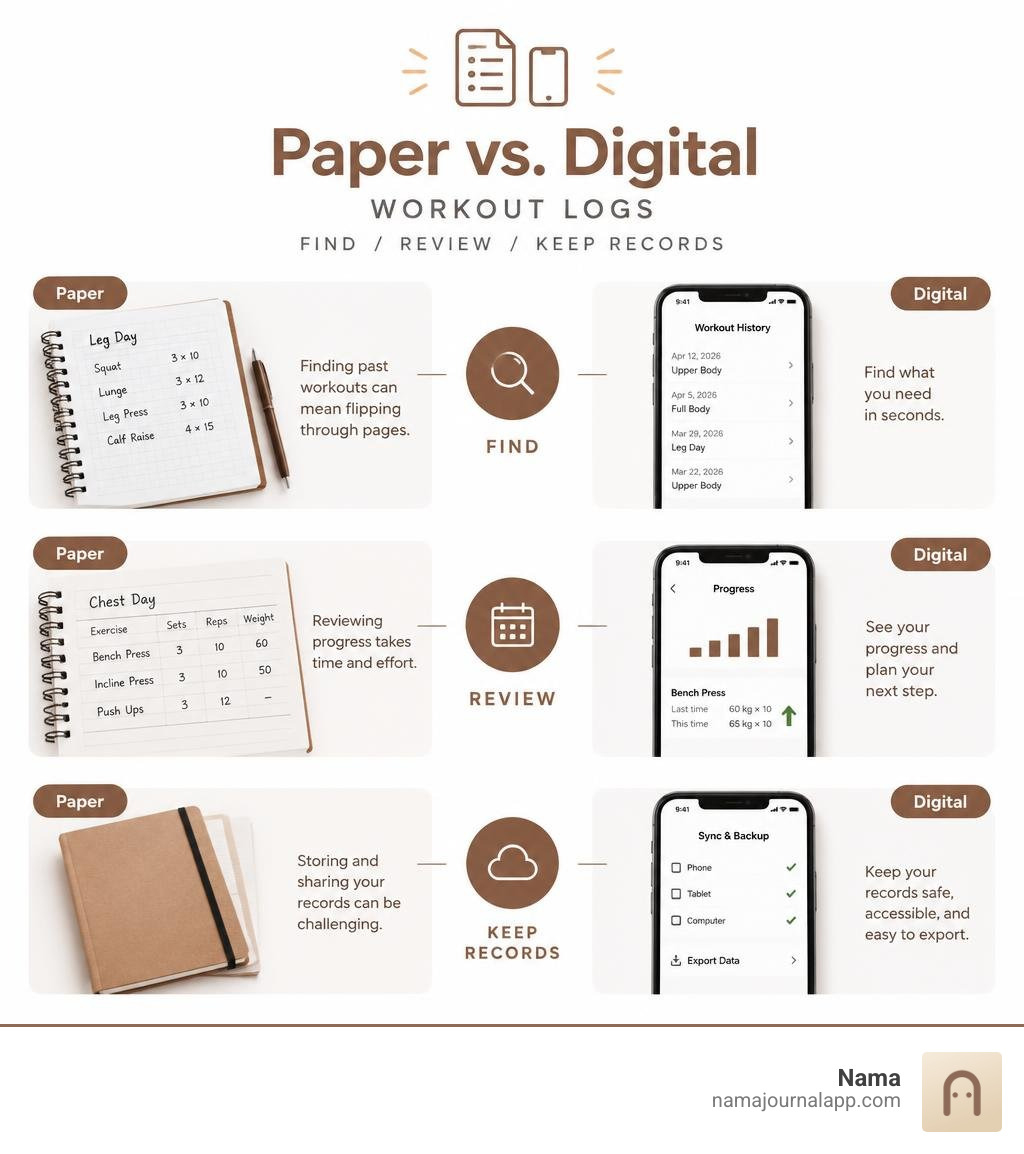
Paper is easy to start with, but finding last month’s sets can mean flipping through pages. A digital log makes it easier to check what you did before and plan a small increase in weight or reps. The choice is less about fancy features and more about keeping a record you can trust.
Key online workout journal vocabulary:
Core Features to Look for in an Online Workout Journal
Transitioning from a traditional spiral notebook to a dedicated digital logger fundamentally changes how you approach training consistency. When you write on paper, you must manually tabulate your total tonnage, flip back through dog-eared pages to recall what you lifted three weeks ago, and estimate whether you are truly applying progressive overload. A well-designed digital tracking setup automates these calculations, providing instant access to your exercise history and past personal records.
To get the most out of your training, consult our workout tracker app ultimate guide to understand how structured data capture elevates performance over time. When evaluating any training log, focus on core mechanics:
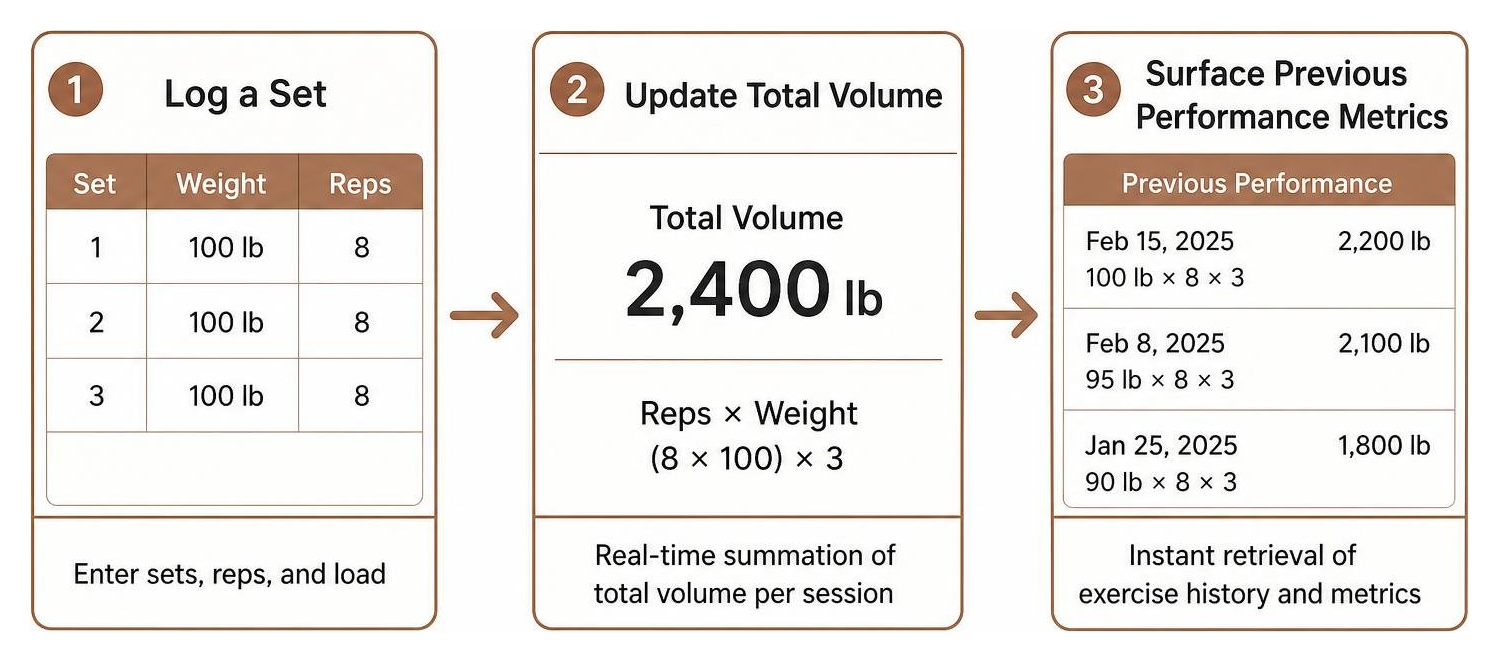
- Intuitive Logging Interface: Entering sets, reps, and load should take seconds between sets without clunky navigation.
- Custom Exercise Creation: The flexibility to add niche movements, machine variations, or specific grip variations.
- Dynamic Volume Tracking: Real-time summation of total volume load (reps multiplied by weight) per muscle group and session.
- Complete Exercise History: Instant retrieval of previous training dates, weights, and set configurations at a glance.
- Personal Record Highlights: Clear milestones for calculated one-rep maximums, rep PRs, and volume peaks.
Scientific research confirms the psychological utility of precise tracking. A comprehensive review by Hermsen et al. (2020) notes that self-tracking physical activity directly reinforces habit formation, self-efficacy, and goal attainment by offering clear feedback loops.
Designing Your Routine with an Online Workout Journal
A structured plan eliminates guesswork when you walk into the weight room. Using a free online workout tracker framework allows you to build recurring routines tailored to your equipment availability, split preferences, and recovery capacity.
When building routines digitally, pair your exercise selection with detailed contextual notes. Adding notes about seat height on a leg press, pin settings on a cable crossover, or specific tempo cues ensures that every repetition remains standardized from week to week. Standardizing your setup prevents artificial progression—where you appear to lift heavier weight simply because you reduced the range of motion.
Advanced Set Tracking, Rest Timers, and Warmup Sets
Progressive training involves more than standard working sets. Modern strength protocols rely heavily on specialized set designations, RPE (Rate of Perceived Exertion) logging, and strict rest management. Utilizing the best weight training tracker tools allows you to categorize your training volume accurately:
- Warmup Sets: Log non-fatiguing preparatory sets that do not count toward your working volume total.
- Drop Sets: Track immediate reductions in resistance taken to technical failure without creating duplicate exercise entries.
- Failure Sets: Tag sets performed to absolute muscular failure to manage weekly fatigue accumulation.
- Automated Rest Timers: Enforce consistent recovery intervals between sets so your strength adaptations remain measurable.
Tracking RPE alongside weight and reps lets you gauge systemic fatigue. If benching 200 pounds felt like an RPE 7 last week but an RPE 9.5 today, your digital journal alerts you to potential recovery deficits before overreaching occurs.
Comparing Digital Formats: Mobile Logging, Offline Access, and Data Export
Choosing a logging medium involves balancing convenience, security, and long-term data accessibility. Many digital platforms store your training logs on remote cloud databases, requiring active subscriptions, persistent network connections, and permanent accounts. Conversely, offline-first mobile journals keep all training logs on your device.

| Feature / Trait | Traditional Paper Notebook | Standard Cloud Fitness App | Privacy-First Offline Mobile Journal |
|---|---|---|---|
| Data Storage Location | Physical paper | Remote third-party servers | Local device storage |
| Account Required | No | Yes (email/social sign-in) | No |
| Internet Dependency | None | High (requires sync/login) | Completely offline |
| Searchability | Slow (manual page flipping) | Instant (search filters) | Instant (local indexing) |
| Automated Math | Manual calculation | Automatic calculations | Automatic calculations |
| Data Portability | Manual transcription | Proprietary / locked formats | Full text and photo export |
Offline Logging and Phone-Based Workouts
Weight rooms, basement gyms, and commercial fitness centers frequently suffer from poor cellular reception and spotty Wi-Fi networks. Cloud-dependent apps can freeze, lag, or fail to sync when you attempt to log a heavy deadlift set in a dead zone.
An offline-first approach ensures that logging remains instantaneous with zero latency. Because no account creation or server authentication is required, your data remains accessible at all times. Everything is written directly to your phone's local storage, preserving battery life and guaranteeing uninterrupted training sessions.
Reviewing and Exporting Workout History
Your fitness journey spans years, meaning your workout history should never be locked behind a proprietary ecosystem or paywall. Having full export capabilities ensures you can convert your training history into structured text files, spreadsheets, or backup archives whenever you choose.
Reviewing historical entries directly on your iPhone allows you to analyze long-term trends, while exporting text-based records and physique photos gives you total ownership over your fitness narrative. Whether you want to share logs with a remote coach or maintain an independent personal fitness archive, local data control keeps your records safe.
Structuring Training Splits and Avoiding Beginner Logging Mistakes
When starting a digital logbook, beginners often make predictable mistakes that skew their data. The most common errors include:
- Inconsistent Load Entry: Mixing dumbbell weights (logging one dumbbell versus the combined pair weight) or omitting the bar weight on barbell lifts.
- Ignoring Warmup Tracking: Failing to differentiate warmups from working sets, which artificially inflates total volume calculations.
- Erratic Volume Spikes: Drastically jumping set counts from week to week instead of making methodical adjustments.
- Neglecting Notes: Forgetting to record technical changes, joint discomfort, or unusual fatigue levels that explain performance dips.
Reviewing practical weekly exercise log tips helps establish standardized habits that keep your data clean and actionable.

How an Online Workout Journal Visualizes Long-Term Progress
Visual analytics transform rows of numbers into intuitive trends. A digital journal automatically processes your inputs to plot:
- Calculated One-Rep Max Curves: Estimating top-end strength over time without requiring frequent maximal singles.
- Weekly Volume Load: Charting total poundage per movement pattern to ensure steady stimulus.
- Rep Progression Trends: Demonstrating technical endurance gains at submaximal loads.
These visual charts provide objective proof of progress, keeping you motivated during training phases where visual physique changes may feel subtle.
Managing Common Training Splits and Deload Cycles
A reliable digital log adapts seamlessly to different programming methodologies. Whether you follow a Push/Pull/Legs rotation, an Upper/Lower split, or a traditional body-part split, your journal should organize routines into repeatable cycles.
Implementing a bodybuilding workout tracker structure also simplifies scheduling deload weeks. During a deload, you intentionally reduce volume by 30 to 50 percent or trim working weights to dissipate accumulated fatigue. Your digital journal preserves your pre-deload baselines so you can ramp back up smoothly once recovery is restored. For those working out in versatile spaces, pairing these principles with practical home exercise log tips ensures progressive overload holds true regardless of environment.
Frequently Asked Questions About Digital Workout Tracking
What is the biggest advantage of switching from paper to digital logs?
The primary advantage is instant retrieval and automated calculations. Digital logs instantly calculate total volume load, calculate estimated one-rep maximums, and store every historical set in an indexable database. This eliminates manual arithmetic and removes the friction of searching through physical pages to determine your previous weights.
How do digital journals calculate one-rep max and volume?
Digital logbooks typically calculate one-rep maximums using established mathematical formulas like the Epley or Brzycki equations:
- Epley Formula: Estimated One-Rep Max = Weight × (1 + (Reps / 30))
- Brzycki Formula: Estimated One-Rep Max = Weight / (1.0278 - (0.0278 × Reps))
Volume load is calculated by multiplying the weight lifted by the number of repetitions completed across all working sets (Volume = Weight × Reps × Sets).
Can I log workouts offline without an internet connection?
Yes, provided you choose an offline-first app designed with local-first architecture. These journals store all exercise routines, historical metrics, and training notes directly on your device's local drive. They require no cloud server connection, meaning zero latency, zero login prompts, and absolute data privacy regardless of gym connectivity.
Conclusion
Upgrading from a paper notebook to a modern digital exercise journal streamlines workout logging, simplifies progressive overload, and provides clear visual proof of your hard work. By choosing a solution that prioritizes local storage and simple export formats, you maintain total ownership over your health records without cloud dependencies or complex accounts.
To begin building your own personalized, private workout routines, start logging with the Nama exercise log and take full control of your fitness data today. You can also explore how to track anything across your daily wellness routine, from hydration to custom recovery metrics, all stored securely on your device.